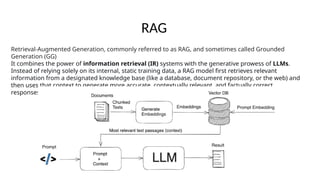
Retrieval-Augmented Generation, commonly referred to as RAG, and sometimes called Grounded
Generation (GG)
It combines the power of information retrieval (IR) systems with the generative prowess of LLMs.
Instead of relying solely on its internal, static training data, a RAG model first retrieves relevant
information from a designated knowledge base (like a database, document repository, or the web) and
then uses that context to generate more accurate, contextually relevant, and factually correct
responses.
RAG
The Core Problem RAG Solves
Frequently Updated Domain Knowledge: If you need a human AI collaborative
solution and your application domain relies on information that changes rapidly or is
updated regularly. Examples include:
1. Internal Company Data: Latest quarterly reports, product catalogs, pricing
sheets, internal policies.
2. Dynamic Fields: Stock market data, news headlines, sports scores, weather
forecasts.
3. Evolving Documentation: Technical manuals, API documentation, and research
papers that are constantly being revised.
Why an LLM Isn't Enough on Its Own
• Hallucinations: Tendency to generate plausible-sounding but incorrect or fabricated information, leading
to a lack of trust.
• Static Knowledge: Their knowledge is frozen at the point of their last training cut-off. They cannot access
or learn about events, data, or information that emerged after that date.
• Lack of Source Attribution: They cannot provide references or cite sources for their answers, making it
difficult to verify claims—a critical issue in medical, legal, and enterprise settings.
• Proprietary & Domain-Specific Ignorance: They have no inherent knowledge of a company's internal
documents, proprietary data, or highly specialized domain knowledge not present in their public training
corpus.
How RAG works
1. The Indexing Phase (Offline): Preparing your knowledge base for efficient search.
2. The Retrieval & Generation Phase (Online): Answering a user's query using the prepared index.
The Indexing Phase
Step 1: Document Loading
What: Gather all your documents—PDFs, Word files, PowerPoint slides, internal wiki pages, HTML pages,
etc.—into a single collection.
Tools: Libraries like LangChain or LlamaIndex have document loaders for almost every file type and
source (e.g., DirectoryLoader, WebBaseLoader).
Step 2: Document Splitting (Chunking)
Why: LLMs have a limited context window. You can't feed a 100-page PDF into a model. You need to
break documents into smaller, meaningful pieces ("chunks").
In a RAG pipeline, documents are usually too long to store or retrieve as a whole. So, they are split into smaller pieces
(“chunks”) before being embedded into a vector database.
• Each chunk gets its own embedding.
• At retrieval time, queries are matched against these chunks.
• Retrieved chunks are then passed into the generator as context.
Step 3: Vectorization (Creating Embeddings)
What is an Embedding? An embedding is a numerical representation of meaning. It's a high-dimensional
vector (a list of numbers, e.g., 768 or 1536 numbers long) where semantically similar chunks of text have
similar vectors.
How: A separate embedding model (e.g., OpenAI's text-embedding-ada-002, Cohere's Embed, or open-
source models like all-MiniLM-L6-v2) converts each text chunk into its corresponding vector.
Analogy: Think of it like plotting words on a map. The words "king," "queen," "prince," and "princess"
would be clustered closely together on this "map of meaning," while the word "car" would be far away.
Vectorization does this mathematically.
Step 4: Storing in a Vector Database
What: The generated vectors, along with the original text chunks they represent (as metadata), are stored
in a specialized database optimized for fast similarity search.
Why a Vector DB? Traditional databases (like SQL) are terrible at finding similar items. Vector databases
(e.g., Chroma, Astra DB, Pinecone, Weaviate, Qdrant) use algorithms like Approximate Nearest Neighbor
(ANN) search to find similar vectors incredibly quickly, even among billions of entries.
The Retrieval & Generation Phase
This happens in real-time when a user asks a question.
Step 1: User Query
The process starts with a user asking a question: "What is the company's policy on remote work?"
Step 2: Query Vectorization
The user's query is converted into a vector using the exact same embedding model from the indexing phase. This
ensures the numerical representations are comparable.
Step 3: Retrieval (Similarity Search)
The vector of the user's query is sent to the vector database.
The database performs a similarity search (e.g., using cosine similarity) to find the k text chunks whose vectors are
"closest" to the query vector—meaning they are most semantically similar.
This retrieves the most relevant context from the entire knowledge base, such as chunks from the "HR Policy v2.3"
document.
Step 4: Augmentation
The retrieved text chunks are combined with the original user query to form a new, enriched "prompt." This is the
"Augmentation" in RAG.
Step 5: Generation
This augmented prompt is sent to the primary, powerful LLM (e.g., GPT-4, Llama 2, etc.).
The LLM's job is now simplified: it synthesizes a coherent, natural-language answer based strictly on the provided context.
It doesn't need to rely on its internal, potentially outdated or incorrect, knowledge.
It generates the final response: "Based on the company's HR Policy document, employees are eligible for remote work if
they have been with the company for over six months and their role is deemed suitable by their manager. A formal
application must be submitted..."
Step 6: Response
The final, well-formatted, and context-grounded answer is delivered back to the user. Advanced systems can also include
the source documents as citations.
Key Problems Identified in RAG Pipelines
Retrieval quality is weak: meaning irrelevant or low-quality documents are being retrieved, which drags down the
generation component.
Mismatched chunking: how you break up your documents (“chunks”) can lead to pieces that are too large (too much
noise) or too small (missing context).
Poor test/evaluation data & metrics: Many RAG systems don’t have good diagnostics to understand where things are
breaking (retriever vs generator vs grounding).
Lack of feedback loops or data-driven iteration: without logging where answers go wrong, it’s hard to fix or improve.
Overfitting to ideal/oracle scenarios: training mostly on “perfect” data (gold documents) which does not reflect
deployed / noisy retrieval; leads to brittle models in production.
Why Chunking Can Break a RAG System
If chunking is poorly designed, you end up with garbage retrieval or unusable context:
Chunks are too big
• Each chunk has lots of irrelevant text mixed in with relevant info.
• Retrieval embeddings may focus on the wrong parts.
• Generator gets “noisy” passages, increasing hallucinations.
Chunks are too small
• Retrieval matches fragments that lack context.
• Generator receives disjointed sentences or half-baked facts.
• Leads to incomplete or misleading answers.
Arbitrary splits (not semantically aligned)
• If you split by fixed token length (e.g. every 512 tokens), you often cut across paragraphs, sections, or sentences.
• That breaks semantic coherence → retrieval embeddings become less meaningful.
Mismatched with query granularity
• If queries are very specific (e.g., “What’s the maximum payload of Falcon 9?”), but chunks contain entire manuals, the
system won’t surface the right fact.
• Conversely, if queries need broader context (e.g., “Explain how Falcon 9 is reused”), tiny fragments won’t suffice.
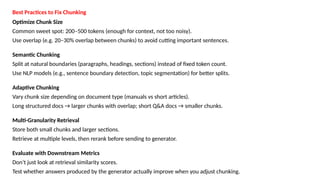
Best Practices to Fix Chunking
Optimize Chunk Size
Common sweet spot: 200–500 tokens (enough for context, not too noisy).
Use overlap (e.g. 20–30% overlap between chunks) to avoid cutting important sentences.
Semantic Chunking
Split at natural boundaries (paragraphs, headings, sections) instead of fixed token count.
Use NLP models (e.g., sentence boundary detection, topic segmentation) for better splits.
Adaptive Chunking
Vary chunk size depending on document type (manuals vs short articles).
Long structured docs → larger chunks with overlap; short Q&A docs → smaller chunks.
Multi-Granularity Retrieval
Store both small chunks and larger sections.
Retrieve at multiple levels, then rerank before sending to generator.
Evaluate with Downstream Metrics
Don’t just look at retrieval similarity scores.
Test whether answers produced by the generator actually improve when you adjust chunking.
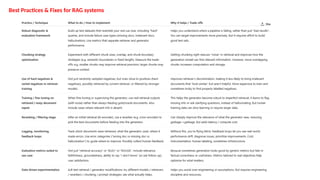
Best Practices & Fixes for RAG systems
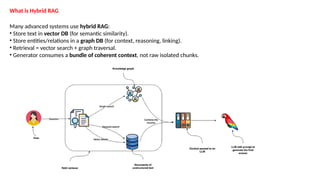
What is Hybrid RAG
Many advanced systems use hybrid RAG:
• Store text in vector DB (for semantic similarity).
• Store entities/relations in a graph DB (for context, reasoning, linking).
• Retrieval = vector search + graph traversal.
• Generator consumes a bundle of coherent context, not raw isolated chunks.
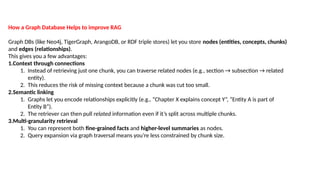
How a Graph Database Helps to improve RAG
Graph DBs (like Neo4j, TigerGraph, ArangoDB, or RDF triple stores) let you store nodes (entities, concepts, chunks)
and edges (relationships).
This gives you a few advantages:
1.Context through connections
1. Instead of retrieving just one chunk, you can traverse related nodes (e.g., section → subsection → related
entity).
2. This reduces the risk of missing context because a chunk was cut too small.
2.Semantic linking
1. Graphs let you encode relationships explicitly (e.g., “Chapter X explains concept Y”, “Entity A is part of
Entity B”).
2. The retriever can then pull related information even if it’s split across multiple chunks.
3.Multi-granularity retrieval
1. You can represent both fine-grained facts and higher-level summaries as nodes.
2. Query expansion via graph traversal means you’re less constrained by chunk size.
RAG System Evaluation
Retrieval-Augmented_Generation_Syestems.pptx

Retrieval-Augmented_Generation_Syestems.pptx

  • 1.
    Retrieval-Augmented Generation, commonlyreferred to as RAG, and sometimes called Grounded Generation (GG) It combines the power of information retrieval (IR) systems with the generative prowess of LLMs. Instead of relying solely on its internal, static training data, a RAG model first retrieves relevant information from a designated knowledge base (like a database, document repository, or the web) and then uses that context to generate more accurate, contextually relevant, and factually correct responses. RAG
  • 2.
    The Core ProblemRAG Solves Frequently Updated Domain Knowledge: If you need a human AI collaborative solution and your application domain relies on information that changes rapidly or is updated regularly. Examples include: 1. Internal Company Data: Latest quarterly reports, product catalogs, pricing sheets, internal policies. 2. Dynamic Fields: Stock market data, news headlines, sports scores, weather forecasts. 3. Evolving Documentation: Technical manuals, API documentation, and research papers that are constantly being revised. Why an LLM Isn't Enough on Its Own • Hallucinations: Tendency to generate plausible-sounding but incorrect or fabricated information, leading to a lack of trust. • Static Knowledge: Their knowledge is frozen at the point of their last training cut-off. They cannot access or learn about events, data, or information that emerged after that date. • Lack of Source Attribution: They cannot provide references or cite sources for their answers, making it difficult to verify claims—a critical issue in medical, legal, and enterprise settings. • Proprietary & Domain-Specific Ignorance: They have no inherent knowledge of a company's internal documents, proprietary data, or highly specialized domain knowledge not present in their public training corpus.
  • 3.
    How RAG works 1.The Indexing Phase (Offline): Preparing your knowledge base for efficient search. 2. The Retrieval & Generation Phase (Online): Answering a user's query using the prepared index. The Indexing Phase Step 1: Document Loading What: Gather all your documents—PDFs, Word files, PowerPoint slides, internal wiki pages, HTML pages, etc.—into a single collection. Tools: Libraries like LangChain or LlamaIndex have document loaders for almost every file type and source (e.g., DirectoryLoader, WebBaseLoader). Step 2: Document Splitting (Chunking) Why: LLMs have a limited context window. You can't feed a 100-page PDF into a model. You need to break documents into smaller, meaningful pieces ("chunks"). In a RAG pipeline, documents are usually too long to store or retrieve as a whole. So, they are split into smaller pieces (“chunks”) before being embedded into a vector database. • Each chunk gets its own embedding. • At retrieval time, queries are matched against these chunks. • Retrieved chunks are then passed into the generator as context.
  • 4.
    Step 3: Vectorization(Creating Embeddings) What is an Embedding? An embedding is a numerical representation of meaning. It's a high-dimensional vector (a list of numbers, e.g., 768 or 1536 numbers long) where semantically similar chunks of text have similar vectors. How: A separate embedding model (e.g., OpenAI's text-embedding-ada-002, Cohere's Embed, or open- source models like all-MiniLM-L6-v2) converts each text chunk into its corresponding vector. Analogy: Think of it like plotting words on a map. The words "king," "queen," "prince," and "princess" would be clustered closely together on this "map of meaning," while the word "car" would be far away. Vectorization does this mathematically. Step 4: Storing in a Vector Database What: The generated vectors, along with the original text chunks they represent (as metadata), are stored in a specialized database optimized for fast similarity search. Why a Vector DB? Traditional databases (like SQL) are terrible at finding similar items. Vector databases (e.g., Chroma, Astra DB, Pinecone, Weaviate, Qdrant) use algorithms like Approximate Nearest Neighbor (ANN) search to find similar vectors incredibly quickly, even among billions of entries.
  • 5.
    The Retrieval &Generation Phase This happens in real-time when a user asks a question. Step 1: User Query The process starts with a user asking a question: "What is the company's policy on remote work?" Step 2: Query Vectorization The user's query is converted into a vector using the exact same embedding model from the indexing phase. This ensures the numerical representations are comparable. Step 3: Retrieval (Similarity Search) The vector of the user's query is sent to the vector database. The database performs a similarity search (e.g., using cosine similarity) to find the k text chunks whose vectors are "closest" to the query vector—meaning they are most semantically similar. This retrieves the most relevant context from the entire knowledge base, such as chunks from the "HR Policy v2.3" document. Step 4: Augmentation The retrieved text chunks are combined with the original user query to form a new, enriched "prompt." This is the "Augmentation" in RAG.
  • 6.
    Step 5: Generation Thisaugmented prompt is sent to the primary, powerful LLM (e.g., GPT-4, Llama 2, etc.). The LLM's job is now simplified: it synthesizes a coherent, natural-language answer based strictly on the provided context. It doesn't need to rely on its internal, potentially outdated or incorrect, knowledge. It generates the final response: "Based on the company's HR Policy document, employees are eligible for remote work if they have been with the company for over six months and their role is deemed suitable by their manager. A formal application must be submitted..." Step 6: Response The final, well-formatted, and context-grounded answer is delivered back to the user. Advanced systems can also include the source documents as citations.
  • 7.
    Key Problems Identifiedin RAG Pipelines Retrieval quality is weak: meaning irrelevant or low-quality documents are being retrieved, which drags down the generation component. Mismatched chunking: how you break up your documents (“chunks”) can lead to pieces that are too large (too much noise) or too small (missing context). Poor test/evaluation data & metrics: Many RAG systems don’t have good diagnostics to understand where things are breaking (retriever vs generator vs grounding). Lack of feedback loops or data-driven iteration: without logging where answers go wrong, it’s hard to fix or improve. Overfitting to ideal/oracle scenarios: training mostly on “perfect” data (gold documents) which does not reflect deployed / noisy retrieval; leads to brittle models in production.
  • 8.
    Why Chunking CanBreak a RAG System If chunking is poorly designed, you end up with garbage retrieval or unusable context: Chunks are too big • Each chunk has lots of irrelevant text mixed in with relevant info. • Retrieval embeddings may focus on the wrong parts. • Generator gets “noisy” passages, increasing hallucinations. Chunks are too small • Retrieval matches fragments that lack context. • Generator receives disjointed sentences or half-baked facts. • Leads to incomplete or misleading answers. Arbitrary splits (not semantically aligned) • If you split by fixed token length (e.g. every 512 tokens), you often cut across paragraphs, sections, or sentences. • That breaks semantic coherence → retrieval embeddings become less meaningful. Mismatched with query granularity • If queries are very specific (e.g., “What’s the maximum payload of Falcon 9?”), but chunks contain entire manuals, the system won’t surface the right fact. • Conversely, if queries need broader context (e.g., “Explain how Falcon 9 is reused”), tiny fragments won’t suffice.
  • 9.
    Best Practices toFix Chunking Optimize Chunk Size Common sweet spot: 200–500 tokens (enough for context, not too noisy). Use overlap (e.g. 20–30% overlap between chunks) to avoid cutting important sentences. Semantic Chunking Split at natural boundaries (paragraphs, headings, sections) instead of fixed token count. Use NLP models (e.g., sentence boundary detection, topic segmentation) for better splits. Adaptive Chunking Vary chunk size depending on document type (manuals vs short articles). Long structured docs → larger chunks with overlap; short Q&A docs → smaller chunks. Multi-Granularity Retrieval Store both small chunks and larger sections. Retrieve at multiple levels, then rerank before sending to generator. Evaluate with Downstream Metrics Don’t just look at retrieval similarity scores. Test whether answers produced by the generator actually improve when you adjust chunking.
  • 10.
    Best Practices &Fixes for RAG systems
  • 11.
    What is HybridRAG Many advanced systems use hybrid RAG: • Store text in vector DB (for semantic similarity). • Store entities/relations in a graph DB (for context, reasoning, linking). • Retrieval = vector search + graph traversal. • Generator consumes a bundle of coherent context, not raw isolated chunks.
  • 12.
    How a GraphDatabase Helps to improve RAG Graph DBs (like Neo4j, TigerGraph, ArangoDB, or RDF triple stores) let you store nodes (entities, concepts, chunks) and edges (relationships). This gives you a few advantages: 1.Context through connections 1. Instead of retrieving just one chunk, you can traverse related nodes (e.g., section → subsection → related entity). 2. This reduces the risk of missing context because a chunk was cut too small. 2.Semantic linking 1. Graphs let you encode relationships explicitly (e.g., “Chapter X explains concept Y”, “Entity A is part of Entity B”). 2. The retriever can then pull related information even if it’s split across multiple chunks. 3.Multi-granularity retrieval 1. You can represent both fine-grained facts and higher-level summaries as nodes. 2. Query expansion via graph traversal means you’re less constrained by chunk size.
  • 13.