In this tutorial, I will show you how to implement Angular 14 Form Validation example (and Submit) with Reactive Forms Module and Bootstrap 4.
More Practice:
– Angular File upload example with progress bar
– Angular CRUD Application example with Web API
– Angular JWT Authentication example with Web Api
Serverless with Firebase:
– Angular 14 Firebase CRUD with Realtime Database
– Angular 14 Firestore CRUD example
– Angular 14 File Upload with Firebase Storage
Using Template Driven Forms instead:
Angular 14 Template Driven Forms Validation example
Contents
Overview of Angular 14 Form Validation example
We will implement validation for a Angular Form using Reactive Forms Module and Bootstrap. The form has:
- Full Name: required
- Username: required, from 6 to 20 characters
- Email: required, email format
- Password: required, from 6 to 40 characters
- Confirm Password: required, same as Password
- Accept Terms Checkbox: required
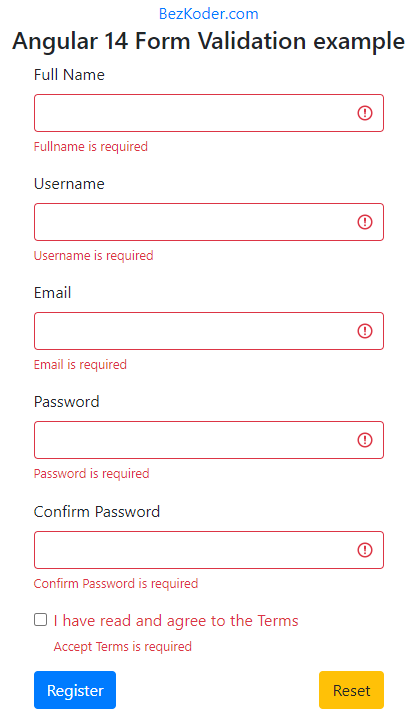
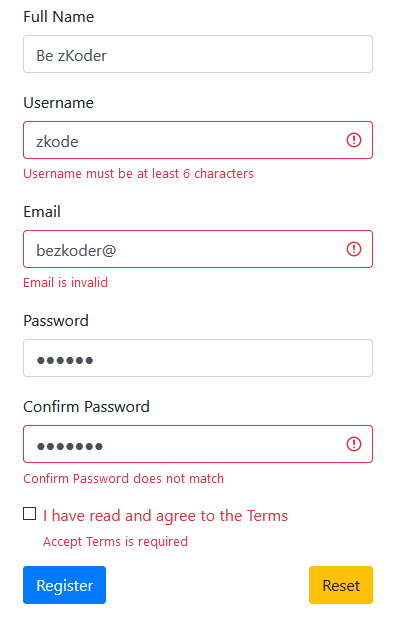
Some fields could be wrong:
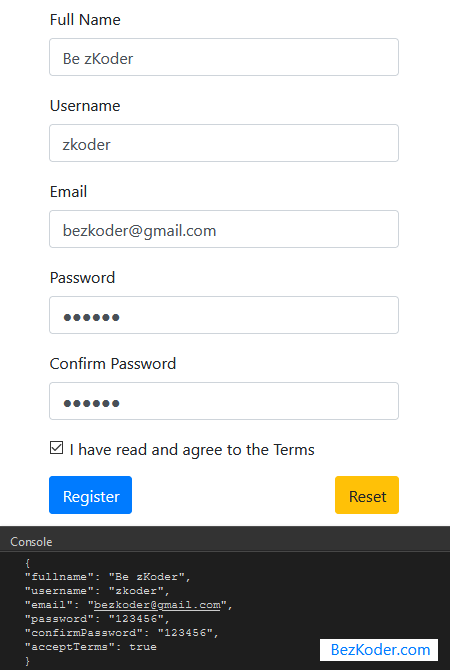
Successful Submission will look like this:
Technology
We’re gonna use following modules:
- Angular 14
- Bootstrap 4
- @angular/forms 14
Setup Project
First we need to add the ReactiveFormsModule into our App Module.
Open src/app/app.module.ts and import ReactiveFormsModule from @angular/forms:
import { NgModule } from '@angular/core';
import { BrowserModule } from '@angular/platform-browser';
import { ReactiveFormsModule } from '@angular/forms';

import { AppComponent } from './app.component';

@NgModule({
  declarations: [
    AppComponent
  ],
  imports: [
    BrowserModule,
    ReactiveFormsModule
  ],
  providers: [],
  bootstrap: [AppComponent]
})
export class AppModule { }
Import Bootstrap
Run the command: npm install [email protected].
Next, open src/style.css and add following code:
@import "~bootstrap/dist/css/bootstrap.css";
Angular 14 Form Validation with Reactive Forms
The app component contains Form Validation example built with the @angular/forms version 14.
Open app/app.component.ts, we’re gonna import necessary library first:
import { Component, OnInit } from '@angular/core';
import { AbstractControl, FormBuilder, FormGroup, Validators } from '@angular/forms';
import Validation from './utils/validation';
We use Angular FormBuilder to create a FormGroup object (form property) which is then bound to the template <form> element (using the [formGroup] directive later).
Validators provides a set of built-in validators (required, minLength, maxLength…) that can be used by form controls.
A validator is a function that processes a FormControl or collection of controls and returns an error map or null (meaning validation has passed).
Validation is our custom class that provides custom validator function. I will explain it later.
export class AppComponent implements OnInit {
  form: FormGroup = new FormGroup({
    fullname: new FormControl(''),
    username: new FormControl(''),
    email: new FormControl(''),
    password: new FormControl(''),
    confirmPassword: new FormControl(''),
    acceptTerms: new FormControl(false),
  });
  submitted = false;

  constructor(private formBuilder: FormBuilder) {}

  ngOnInit(): void {
    this.form = this.formBuilder.group(
      {
        fullname: ['', Validators.required],
        username: [
          '',
          [
            Validators.required,
            Validators.minLength(6),
            Validators.maxLength(20)
          ]
        ],
        email: ['', [Validators.required, Validators.email]],
        password: [
          '',
          [
            Validators.required,
            Validators.minLength(6),
            Validators.maxLength(40)
          ]
        ],
        confirmPassword: ['', Validators.required],
        acceptTerms: [false, Validators.requiredTrue]
      },
      {
        validators: [Validation.match('password', 'confirmPassword')]
      }
    );
  }

  ...
}
We also have getter f to access form controls (form.controls) from the template. For example, we can get username field in the template using f.username instead of form.controls.username.
The submitted property helps us to check whether the form is submitted or not.
export class AppComponent implements OnInit {
  form: FormGroup = ...;
  submitted = false;

  constructor(private formBuilder: FormBuilder) {}

  ngOnInit(): void {
    ...
  }

  get f(): { [key: string]: AbstractControl } {
    return this.form.controls;
  }

  onSubmit(): void {
    this.submitted = true;

    if (this.form.invalid) {
      return;
    }

    console.log(JSON.stringify(this.form.value, null, 2));
  }

  onReset(): void {
    this.submitted = false;
    this.form.reset();
  }
}
Angular 14 Form Validation template
Now we create the form with input fields and validation messages.
We bind to the FormGroup object (form) in the app component using [formGroup] directive. Form submit event will call onSubmit() handler above using event binding (ngSubmit).
Validation messages will display after form submission for the first time by submitted property.
app/app.component.html
<div class="register-form">
  <form [formGroup]="form" (ngSubmit)="onSubmit()">
    <div class="form-group">
      <label>Full Name</label>
      <input
        type="text"
        formControlName="fullname"
        class="form-control"
        [ngClass]="{ 'is-invalid': submitted && f['fullname'].errors }"
      />
      <div *ngIf="submitted && f['fullname'].errors" class="invalid-feedback">
        <div *ngIf="f['fullname'].errors['required']">Fullname is required</div>
      </div>
    </div>

    <div class="form-group">
      <label>Username</label>
      <input
        type="text"
        formControlName="username"
        class="form-control"
        [ngClass]="{ 'is-invalid': submitted && f['username'].errors }"
      />
      <div *ngIf="submitted && f['username'].errors" class="invalid-feedback">
        <div *ngIf="f['username'].errors['required']">Username is required</div>
        <div *ngIf="f['username'].errors['minlength']">
          Username must be at least 6 characters
        </div>
        <div *ngIf="f['username'].errors['maxlength']">
          Username must not exceed 20 characters
        </div>
      </div>
    </div>

    <div class="form-group">
      <label>Email</label>
      <input
        type="text"
        formControlName="email"
        class="form-control"
        [ngClass]="{ 'is-invalid': submitted && f['email'].errors }"
      />
      <div *ngIf="submitted && f['email'].errors" class="invalid-feedback">
        <div *ngIf="f['email'].errors['required']">Email is required</div>
        <div *ngIf="f['email'].errors['email']">Email is invalid</div>
      </div>
    </div>

    <div class="form-group">
      <label>Password</label>
      <input
        type="password"
        formControlName="password"
        class="form-control"
        [ngClass]="{ 'is-invalid': submitted && f['password'].errors }"
      />
      <div *ngIf="submitted && f['password'].errors" class="invalid-feedback">
        <div *ngIf="f['password'].errors['required']">Password is required</div>
        <div *ngIf="f['password'].errors['minlength']">
          Password must be at least 6 characters
        </div>
        <div *ngIf="f['password'].errors['maxlength']">
          Username must not exceed 40 characters
        </div>
      </div>
    </div>

    <div class="form-group">
      <label>Confirm Password</label>
      <input
        type="password"
        formControlName="confirmPassword"
        class="form-control"
        [ngClass]="{ 'is-invalid': submitted && f['confirmPassword'].errors }"
      />
      <div
        *ngIf="submitted && f['confirmPassword'].errors"
        class="invalid-feedback"
      >
        <div *ngIf="f['confirmPassword'].errors['required']">
          Confirm Password is required
        </div>
        <div *ngIf="f['confirmPassword'].errors['matching']">
          Confirm Password does not match
        </div>
      </div>
    </div>

    <div class="form-group form-check">
      <input
        type="checkbox"
        formControlName="acceptTerms"
        class="form-check-input"
        [ngClass]="{ 'is-invalid': submitted && f['acceptTerms'].errors }"
      />
      <label for="acceptTerms" class="form-check-label"
        >I have read and agree to the Terms</label
      >
      <div *ngIf="submitted && f['acceptTerms'].errors" class="invalid-feedback">
        Accept Terms is required
      </div>
    </div>

    <div class="form-group">
      <button type="submit" class="btn btn-primary">Register</button>
      <button
        type="button"
        (click)="onReset()"
        class="btn btn-warning float-right"
      >
        Reset
      </button>
    </div>
  </form>
</div>
Angular 14 Confirm Password validation
Now we will use Angular Custom Validator to implement password and confirm password validation..
– First, the validator returns null (meaning validation has passed) if there is any error on the control that we want to check (confirm password).
– Then, the validator checks that two fields match or not and set error on checking control if validation fails.
utils/validation.ts
import { AbstractControl, ValidatorFn } from '@angular/forms';

export default class Validation {
  static match(controlName: string, checkControlName: string): ValidatorFn {
    return (controls: AbstractControl) => {
      const control = controls.get(controlName);
      const checkControl = controls.get(checkControlName);

      if (checkControl?.errors && !checkControl.errors['matching']) {
        return null;
      }

      if (control?.value !== checkControl?.value) {
        controls.get(checkControlName)?.setErrors({ matching: true });
        return { matching: true };
      } else {
        return null;
      }
    };
  }
}
Run Angular 14 Form Validation example
You can run our App with command: ng serve.
If the process is successful, open Browser with Url: http://localhost:4200/ and check it.
Or run on Stackblitz:
Conclusion
Today we’ve built Angular 14 Form Validation example successfully with Reactive Forms Module & Bootstrap 4.
You can also use the Form Validation in following posts:
– Angular File upload example with progress bar
– Angular CRUD Application example with Web API
– Angular JWT Authentication example with Web Api
Or using Template Driven Forms instead:
Angular 14 Template Driven Forms Validation example
The source code for this example can be found on Github.
Happy learning! See you again.
Further Reading
Serverless with Firebase:
– Angular 14 Firebase CRUD with Realtime Database
– Angular 14 Firestore CRUD example
– Angular 14 File Upload with Firebase Storage
Fullstack CRUD Application:
– Angular + Node Express + MySQL example
– Angular + Node Express + PostgreSQL example
– Angular + Node Express + MongoDB example
– Angular + Spring Boot + H2 example
– Angular + Spring Boot + MySQL example
– Angular + Spring Boot + PostgreSQL example
– Angular + Spring Boot + MongoDB example
– Angular + Django example
– Angular + Django + MySQL example
– Angular + Django + PostgreSQL example
– Angular + Django + MongoDB example