halo.Add
halo.Add( table entities, table color, number blurX = 2, number blurY = 2, number passes = 1, boolean additive = true, boolean ignoreZ = false )
Description
Applies a halo glow effect to one or multiple entities. It is preferable to add them in GM:PreDrawHalos, but they can be added at any time.
The ignoreZ parameter will cause the halos to draw over the player's viewmodel. You can work around this using render.DepthRange in the GM:PreDrawViewModel, GM:PostDrawViewModel, GM:PreDrawPlayerHands and GM:PostDrawPlayerHands hooks.
Arguments
5 number passes = 1
The number of times the halo should be drawn per frame. Increasing this may hinder player FPS.
Example
Adds a halo around all props in the map using an O(n) operation and iterating through unseen objects which can be extremely expensive to process.
Output: 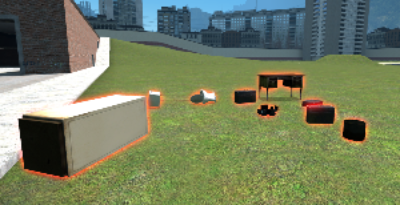 All the props on the map will be rendered with a red halo, a blur amount of 5, and two passes.
 All the props on the map will be rendered with a red halo, a blur amount of 5, and two passes.
 Garry's Mod
 Rust
Rust
 Steamworks
 Wiki Help