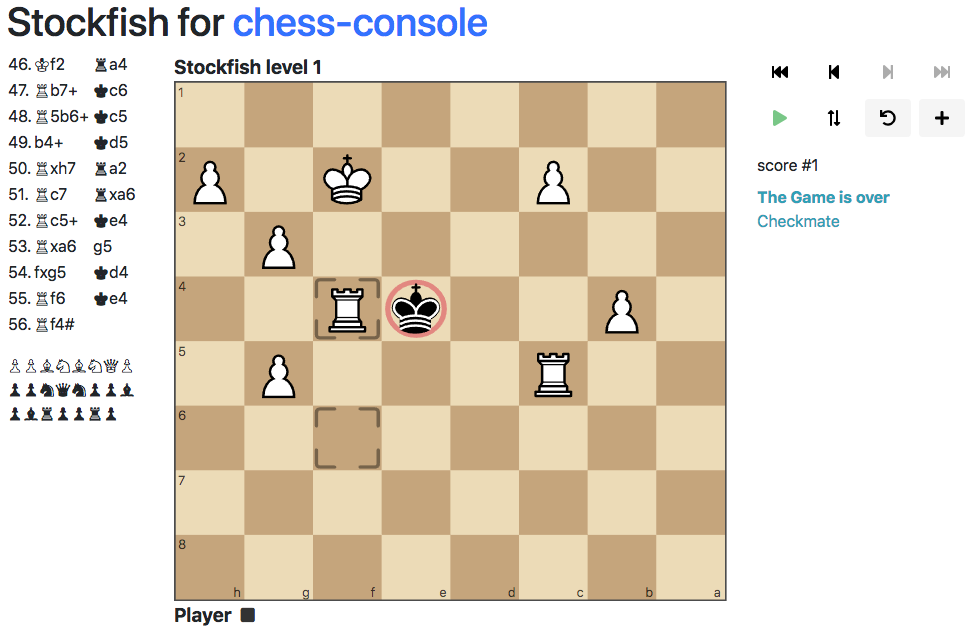
ChessConsole is a JavaScript-based chess game client framework that uses cm-chessboard and Bootstrap to create a browser-based, mobile-friendly, responsive chess game GUI.
Used by chessmail as a framework for an online chess computer.
Because of its component architecture chess-console is expandable for all kind of chess pages. You may check out the Stockfish Player for chess-console, a fully functional online chess computer.
- Clone the repository:
git clone https://github.com/shaack/chess-console.git
- Navigate to the project directory and install dependencies:
cd chess-console
npm install
- Install the npm package:
npm install chess-console
To initialize a new ChessConsole instance, you need to provide the context, player, opponent, and optional properties.
import { ChessConsole } from 'chess-console';

const context = document.getElementById('chess-console');
// a LocalPlayer, that can be controlled by the user
const player = { type: LocalPlayer, name: 'Player 1', props: {} };
// an engine player, that playes random moves
const opponent = { type: RandomPlayer, name: 'Player 2', props: {} };

const chessConsole = new ChessConsole(context, player, opponent, {
    locale: 'en',
    playerColor: 'w',
    pgn: undefined,
    accessible: false
});Open any HTML file in the examples/ directory directly in a browser (requires a local web server due to ES6 modules):
examples/minimal.html- Minimal setup without persistenceexamples/play-both-local.html- Two local playersexamples/game-with-random.html- Play against random moves engineexamples/load-pgn.html- Load games from PGN notation
ChessConsole (src/ChessConsole.js)
- Main orchestrator class that manages the entire game
- Initializes with: context (DOM element), player, opponent, and optional props
- Creates a MessageBroker for pub/sub communication between components
- Manages game flow via
initGame(),newGame(), andnextMove() - Delegates to players via
moveRequest()→ player responds via callback →handleMoveResponse()validates and processes - Key message topics defined in
CONSOLE_MESSAGE_TOPICS: newGame, initGame, gameOver, moveRequest, legalMove, illegalMove, moveUndone, load
ChessConsoleState (src/ChessConsoleState.js)
- Holds game state: Chess instance (cm-chess), orientation, plyViewed
- Provides
observeChess()to watch for chess manipulation methods (move, load, undo, etc.) - Uses cm-web-modules Observe utility for reactive state tracking
ChessConsolePlayer (src/ChessConsolePlayer.js)
- Abstract base class for all player types
- Subclasses must implement
moveRequest(fen, moveResponse)method - moveResponse is a callback that receives {from, to, promotion} move object
LocalPlayer (src/players/LocalPlayer.js)
- Human player controlled via chessboard drag-and-drop
- Handles move input events from cm-chessboard
- Supports promotion dialogs via
validateMoveAndPromote() - Implements premove support (optional via props.allowPremoves)
- Enables/disables chessboard move input based on turn
RandomPlayer (src/players/RandomPlayer.js)
- Computer player that makes random legal moves
- Uses chess.mjs to validate moves independently
- Configurable delay (default 1000ms) via props.delay
Components are instantiated after ChessConsole initialization and subscribe to message broker topics:
Board (src/components/Board.js)
- Wraps cm-chessboard with player name labels and markers
- Manages visual state: position updates, legal move markers, check indicators, last move highlights
- Subscribes to state changes via Observe.property
- Configures extensions: PromotionDialog, Markers, Accessibility, AutoBorderNone
- Marker types defined in
CONSOLE_MARKER_TYPE
GameStateOutput (src/components/GameStateOutput.js)
- Displays current game state text (check, checkmate, stalemate, etc.)
History (src/components/History.js)
- Displays move history in algebraic notation
HistoryControl (src/components/HistoryControl.js)
- Navigation controls for viewing previous positions
CapturedPieces (src/components/CapturedPieces.js)
- Shows captured pieces for both sides
Sound (src/components/Sound.js)
- Plays sound effects for moves, captures, check, etc.
GameControl (src/components/GameControl/GameControl.js)
- Buttons for game actions (new game, undo, flip board, etc.)
Persistence (src/components/Persistence.js)
- Saves/loads game state to localStorage
Game initialization → ChessConsole.initGame() → publishes initGame message → components update
Player turn → ChessConsole.nextMove() → player.moveRequest(fen, moveResponse) → player makes move → moveResponse(move) → ChessConsole.handleMoveResponse() → validates → publishes legalMove/illegalMove → updates state → triggers next move or gameOver
State changes propagate via:
- MessageBroker pub/sub for game events
- Observe.property for reactive state tracking
- ChessConsoleState.observeChess() for chess manipulation detection
- cm-chessboard - Interactive chessboard UI component
- cm-chess - Chess logic and validation
- chess.mjs - Alternative chess library used by players
- cm-pgn - PGN parsing
- cm-web-modules - Utilities (I18n, MessageBroker, Observe, DomUtils)
- bootstrap-show-modal - Modal dialogs
Components can register themselves in chessConsole.components for cross-component access (e.g., Board registers itself so other components can access the promotion dialog).
Both ChessConsole and Board expose an initialized Promise that resolves when async initialization (i18n loading, etc.) completes. Always await these before calling methods.
Example:
const chessConsole = new ChessConsole(context, player, opponent, props)
chessConsole.initialized.then((chessConsole) => {
    new Board(chessConsole, boardProps)
    chessConsole.newGame()
})Source code license: MIT,
License for the Sounds: CC BY 4.0,
License of the SVG pieces CC BY-SA 3.0.
Copyright © shaack.com.