
Update – Dec. 8, 2025: I got some feedback from a member of the Windows File Systems Team. They can reproduce the issue and also pointed out the leaking driver is not enabled in most cases:
Wcifs only gets attached if there are specific applications/services that use it: like Windows Containers (including server containers, Windows Sandbox, etc), or certain Gamepass for PC games.
This is an homage to the old “The Case of’…” series Mark Russinovich used to write (and later present), that demonstrated the power of the Sysinternals tools. Tools like Process Monitor, Process Explorer and Handle are still very relevant today but there are times when they can’t quite do all the heavy lifting and you just don’t have the time to spend hours or days on a problem.
In this case, my laptop had an intermittent handle leak in the SYSTEM process. Catching the leaking entity in the act is difficult without some sort of scripting, and scripting takes time.
This appears to be a fruitful area for LLMs to assist: they are better than me at Python, they are pretty good at small projects, and even if there is a bug, the code will never be shipped to a customer.
SYSTEM Handle Count Out of Control
My dev laptop was running quite sluggishly last week and, after poking around Task Manager, I noticed the handle count in the SYSTEM process was close to 5 million handles! This number is absurdly high, and is either a leak or a very badly behaved driver.
Why does it matter? Handles are associated with kernel objects and kernel objects take up memory. In my case, the non-paged pool usage on my system was over 9GB!
I didn’t have much of a hypothesis, though one important detail about the SYSTEM process: its threads all run in kernel mode. So, any handle leak in the SYSTEM process has to come from a kernel component.

I gathered a bit more data using Handle:
C:\Windows\System32>handle -p 4 -s
Nthandle v5.0 - Handle viewer
Copyright (C) 1997-2022 Mark Russinovich
Sysinternals - www.sysinternals.com

Handle type summary:
ALPC Port : 186
...
File : 4980368
Almost five million file handle leaks. Tracking down file handle leaks can be really tough because there is just so much file activity on a modern Windows machine.
Next, I took a look in Process Explorer to see if I could spot any patterns. It’s hard to scroll through 5 million handles, but I did notice that many of them were coming from the WinSxs directory.

A Watched Kettle…
I monitored the handle count on the SYSTEM process for a few minutes and it wasn’t budging. It was 11:30 pm at this point and so I asked Claude to help:
Write a Python script that monitors the handle count in the Windows 11 SYSTEM process. Output the handle count every 30 seconds, along with the timestamp.
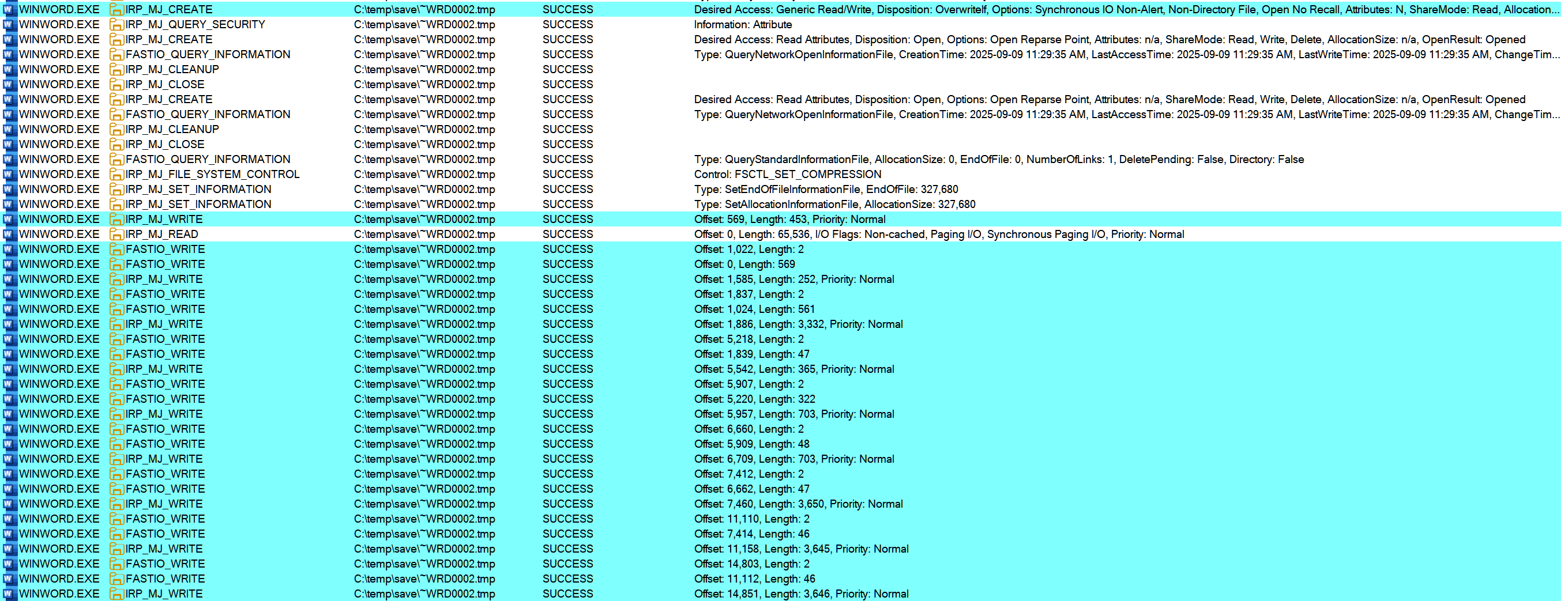
I ran this and also started Procmon with a restrictive filter to only monitor file CREATEs (open) and file CLEANUPs (close) in the SYSTEM process. This turned out to be useless data: for security, file handles opened in kernel live in the SYSTEM process handle table, BUT kernel drivers run inline in arbitrary processes. Just monitoring the SYSTEM process is not very useful.
An Unwatched Kettle…
I woke up the next day, hoping for a hot cup of tea, but ending up disappointed. On the positive side, Claude’s script worked well. I could see periods where the handle count went up significantly.
On the downside, the Procmon trace revealed nothing interesting. I ran it the next night and observed the same thing, around the same time.
2025-11-20 01:12:45 handles=10130
2025-11-20 01:13:15 handles=10451
2025-11-20 01:13:45 handles=11534
2025-11-20 01:14:15 handles=12617
2025-11-20 01:14:45 handles=13803
2025-11-20 01:15:15 handles=15092
2025-11-20 01:15:45 handles=16424
2025-11-20 01:16:15 handles=17541
2025-11-20 01:16:45 handles=18613
2025-11-20 01:17:15 handles=19659
2025-11-20 01:17:45 handles=20740
2025-11-20 01:18:15 handles=21930
2025-11-20 01:18:45 handles=23210
2025-11-20 01:19:15 handles=23982
2025-11-20 01:19:45 handles=28911
2025-11-20 01:20:15 handles=34885
2025-11-20 01:20:45 handles=39735
2025-11-20 01:21:15 handles=43154
2025-11-20 01:21:45 handles=44380
2025-11-20 01:22:15 handles=45831
2025-11-20 01:22:45 handles=46990
2025-11-20 01:23:15 handles=47557
2025-11-20 01:23:45 handles=47573
2025-11-20 01:24:15 handles=47595
2025-11-20 01:24:45 handles=47578
2025-11-20 01:25:15 handles=47559
2025-11-20 01:25:45 handles=47567
I’m not sure if I would have even gotten this far without an LLM assisting. I *could* have written a similar script but I just don’t think I would have spent the time to do so, unless it was part of my daily work. And even if I had gotten this far, I would not have gone any further.
Here’s the interesting part: instead of mulling over what the *problem* might be, my brain was mulling over what I could ask the LLM to do to help me. And when it came to me on Saturday morning when I was making muffins (the ‘shower’ effect), it again only took a couple of minutes for Claude to modify my initial script.
I needed to catch the leaking kernel component in the act. Process Monitor might have been able to do the job (with the /runtime command) but I turned to the heavy hitter: Windows Performance Recorder, and it’s built in Handle profile.
I need help modifying this script.

In a 30 second window, if the handle count grows by more than 1000, I would like you to add the following logic:

- Start a wpr trace with the command:
Wpr.exe -start GeneralProfile -start Handle -filemode

- After one minute, stop the trace and save it to the c:\traces folder, creating the folder if it does not exist. For the next 60 minutes, even if the handle count grows by more than 1000, do not start a trace.
Finally, a Reproduction!
The next morning, I had a WPR trace ready to analyze. The handle data clearly showed that a Powershell process was triggering a bunch of handle creations in the SYSTEM process handle table. That’s not necessarily a smoking gun on its own, since I only ran the trace for one minute.
However, my monitoring script showed that the handle count never dropped back down, even after hours.
One other point: incidentally the filenames even matched my anecdotal observations – many were in the WinSxS folder.
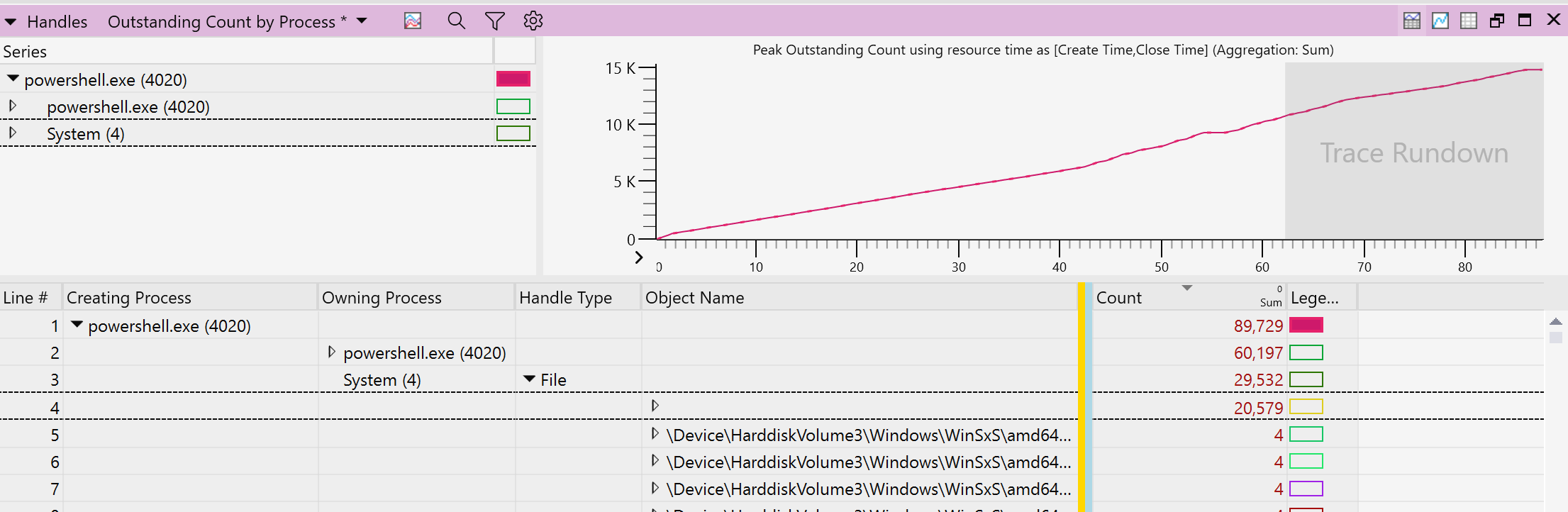

That instance of Powershell was (thankfully) executing a very short script:
[CmdletBinding()]
param()

$locations = @()

Get-PSDrive -p "FileSystem" | ForEach-Object {
     $locations += Get-ChildItem -Path "$($_.Root)" -Recurse -Name "_conda.exe" -Force
}

Write-Output $(ConvertTo-Json -InputObject $locations -Depth 100 -Compress)
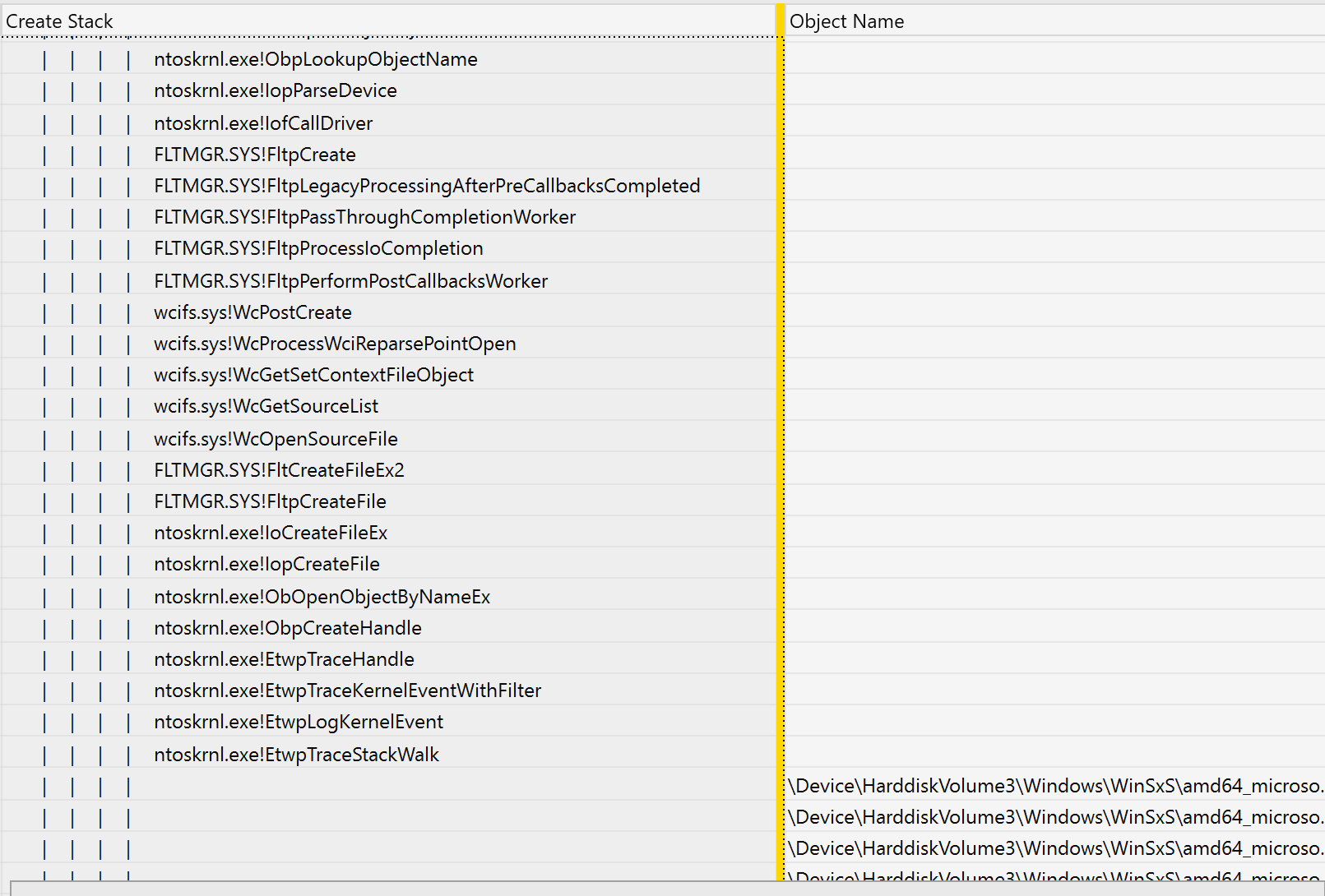
The WPR trace also gave me the call stack at handle creation time, pointing to the Windows driver wcifs.sys:
Sigcheck v2.90 - File version and signature viewer
Copyright (C) 2004-2022 Mark Russinovich
Sysinternals - www.sysinternals.com

C:\Windows\System32\drivers\wcifs.sys:
        Verified:       Signed
        Signing date:   9:13 PM 9/25/2025
        Publisher:      Microsoft Windows
        Company:        Microsoft Corporation
        Description:    Windows Container Isolation FS Filter Driver
        Product:        Microsoft« Windows« Operating System
        Prod version:   10.0.26100.6725
        File version:   10.0.26100.6725 (WinBuild.160101.0800)
        MachineType:    64-bit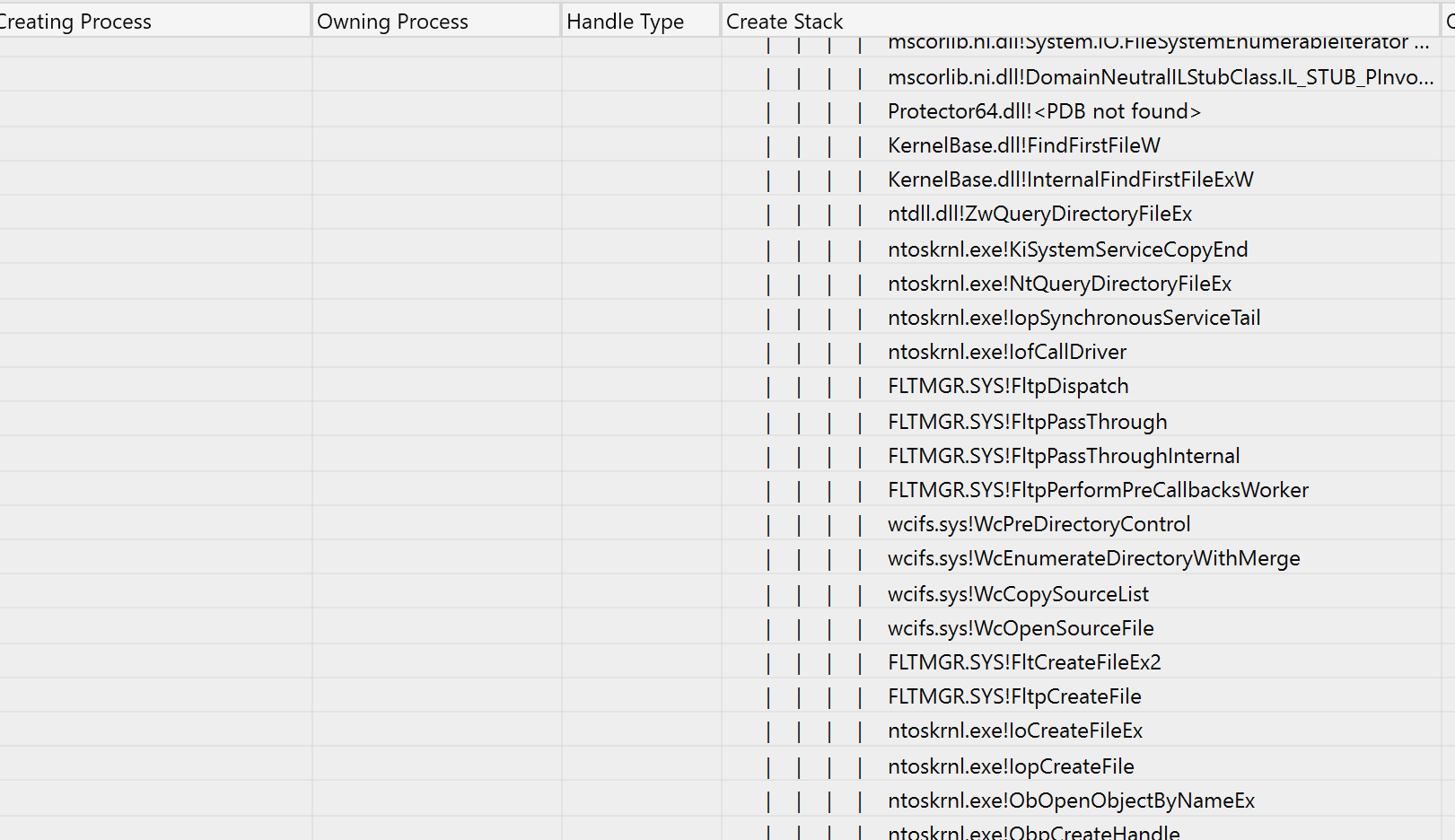
The Power and Curse of LLMs
At this point, I could reproduce at will by running the Powershell script. Detaching wcifs from the filesystem eliminated the issue:
fltmc detach wcifs c:
I didn’t feel much satisfaction in figuring this out, perhaps because the LLM did most of the typing. I just wanted to keep going and pin down the reason for the leak in wcifs. So, I got Ghidra up and running, installed GhidraMCP and asked Claude to help me figure out why the handles were leaking. Most of a 4 hour train ride later, it still didn’t have anything convincing to report, though it does seem to be pretty good at converting assembly code into C.
I’ll report this to Microsoft and update the post with their response
Claude’s Script
For completeness, here’s the script. WordPress won’t let me upload it as a file.
#!/usr/bin/env python3
"""
handle_watch.py — Print Windows handle counts every 10 seconds.

Default: monitor SYSTEM (PID 4).
Optional: --total to print total system handles instead.
"""

import argparse
import os
import subprocess
import sys
import time
from datetime import datetime

try:
    import psutil  # pip install psutil
except ImportError:
    print("This script requires 'psutil'. Install with: pip install psutil", file=sys.stderr)
    sys.exit(1)

try:
    from colorama import init, Fore, Style
    init()  # Initialize colorama for Windows color support
    COLOR_AVAILABLE = True
except ImportError:
    print("This script will display color if you have 'colorama'. Install with: pip install colorama", file=sys.stderr)
    COLOR_AVAILABLE = False


def get_handles_for_pid(pid: int) -> int:
    """Return handle count for a specific PID (Windows only)."""
    try:
        p = psutil.Process(pid)
        return p.num_handles()  # Windows-only attribute
    except psutil.NoSuchProcess:
        raise RuntimeError(f"Process with PID {pid} not found.")
    except psutil.AccessDenied:
        raise RuntimeError(f"Access denied retrieving handles for PID {pid}. Try running as Administrator.")


def get_total_handles() -> int:
    """Return total handle count across all processes (Windows only)."""
    total = 0
    for p in psutil.process_iter(attrs=[]):
        try:
            total += p.num_handles()
        except (psutil.NoSuchProcess, psutil.AccessDenied):
            # Skip processes that vanished or are protected
            continue
    return total


def start_wpr_trace():
    """Start WPR trace with specified profiles."""
    cmd = [
        "Wpr.exe",
        "-start", "Handle",
        "-filemode"
    ]
    try:
        subprocess.run(cmd, check=True, capture_output=True, text=True)
        print(f"{datetime.now().strftime('%Y-%m-%d %H:%M:%S')}  WPR trace started")
        return True
    except subprocess.CalledProcessError as e:
        print(f"{datetime.now().strftime('%Y-%m-%d %H:%M:%S')}  Failed to start WPR trace: {e}", file=sys.stderr)
        return False


def stop_wpr_trace():
    """Stop WPR trace and save to c:\\traces folder."""
    # Create traces folder if it doesn't exist
    traces_dir = r"c:\traces"
    os.makedirs(traces_dir, exist_ok=True)

    # Generate filename with timestamp
    timestamp = datetime.now().strftime("%Y%m%d_%H%M%S")
    trace_file = os.path.join(traces_dir, f"handle_spike_{timestamp}.etl")

    cmd = ["Wpr.exe", "-stop", trace_file]
    try:
        subprocess.run(cmd, check=True, capture_output=True, text=True)
        print(f"{datetime.now().strftime('%Y-%m-%d %H:%M:%S')}  WPR trace saved to {trace_file}")
        return True
    except subprocess.CalledProcessError as e:
        print(f"{datetime.now().strftime('%Y-%m-%d %H:%M:%S')}  Failed to stop WPR trace: {e}", file=sys.stderr)
        return False


def main():
    if os.name != "nt":
        print("This script only works on Windows (requires num_handles).", file=sys.stderr)
        sys.exit(1)

    parser = argparse.ArgumentParser(description="Print Windows handle counts every 10 seconds.")
    group = parser.add_mutually_exclusive_group()
    group.add_argument("--pid", type=int, default=4, help="PID to monitor (default: 4 for SYSTEM).")
    group.add_argument("--total", action="store_true", help="Show total system handle count.")
    parser.add_argument("--interval", type=float, default=30.0, help="Polling interval in seconds (default: 30).")
    parser.add_argument("--handle-threshold", type=int, default=1000, help="Handle count increase threshold to trigger WPR trace (default: 1000).")
    parser.add_argument("--cooldown", type=int, default=3600, help="Cooldown period in seconds before allowing another trace (default: 3600 = 1 hour).")
    parser.add_argument("--trace-duration", type=int, default=60, help="Duration in seconds to run WPR trace (default: 60).")
    args = parser.parse_args()

    mode = "total" if args.total else f"pid={args.pid}"
    print(f"Monitoring handles ({mode}), interval={args.interval}s. Press Ctrl+C to stop.")
    print(f"WPR trace settings: handle-threshold={args.handle_threshold}, cooldown={args.cooldown}s, duration={args.trace_duration}s")

    prev_count = None
    last_trace_time = 0  # Timestamp of last trace start
    trace_active = False
    trace_start_time = 0

    try:
        while True:
            try:
                if args.total:
                    count = get_total_handles()
                else:
                    count = get_handles_for_pid(args.pid)
                ts = datetime.now().strftime("%Y-%m-%d %H:%M:%S")

                # Calculate delta
                if prev_count is not None:
                    delta = count - prev_count
                    if COLOR_AVAILABLE:
                        if delta > 0:
                            # Check if delta exceeds threshold - emphasize with bold + bright
                            if delta > args.handle_threshold:
                                delta_str = f"  delta={Fore.RED}{Style.BRIGHT}{delta:+d}{Style.RESET_ALL}"
                            else:
                                delta_str = f"  delta={Fore.RED}{delta:+d}{Style.RESET_ALL}"
                        elif delta < 0:
                            delta_str = f"  delta={Fore.GREEN}{delta:+d}{Style.RESET_ALL}"
                        else:
                            delta_str = f"  delta={delta:+d}"
                    else:
                        delta_str = f"  delta={delta:+d}"
                else:
                    delta_str = ""

                print(f"{ts}  handles={count}{delta_str}")

                # Check for handle count spike
                if prev_count is not None:
                    current_time = time.time()

                    # If delta > threshold and we're past the cooldown period
                    if delta > args.handle_threshold:
                        time_since_last_trace = current_time - last_trace_time
                        if time_since_last_trace >= args.cooldown and not trace_active:
                            print(f"{ts}  Handle count increased by {delta} (threshold: {args.handle_threshold})")
                            if start_wpr_trace():
                                trace_active = True
                                trace_start_time = current_time
                                last_trace_time = current_time

                # Check if we need to stop an active trace
                if trace_active and (time.time() - trace_start_time >= args.trace_duration):
                    stop_wpr_trace()
                    trace_active = False

                prev_count = count

            except RuntimeError as e:
                # Print the error but keep looping
                ts = datetime.now().strftime("%Y-%m-%d %H:%M:%S")
                print(f"{ts}  error: {e}", file=sys.stderr)

            time.sleep(args.interval)
    except KeyboardInterrupt:
        # Stop trace if active when interrupted
        if trace_active:
            print("\nStopping active trace...")
            stop_wpr_trace()
        print("\nStopped.")


if __name__ == "__main__":
    main()






 Needle in a Thread Stack