
Here are some Mods for Discord Bot Maker! Feel free to use them in your bots. But please, if you want to share this files please share the URL of this GitHub page. Then everyone can have the latest update!
Make sure to join the DBM MODS DISCORD SERVER. To stay updated and be able to suggest things! https://discord.gg/Y4fPBnZ
NEW FEATURES: ● Check Variable length ● HTML and Json fixes ● Generate Random Hex Color ● Change images name ● Delete File ● Cleverbot .io & .com support ● Randomize Letters ● Slice variable ● Translate variable ● Store Attachment Info ... and much more!
Install Mods: How to install mods:
- Download this file http://bit.ly/2pJiqv6
- Open ZIP and open the first (and only) folder
- Open DBM
- Click on Project
- Click on Open Actions Directory
- Go one folder back, you should be at /steamapps/common/Discord Bot Maker
- Now copy all files you downloaded out of the zip file
- Paste them into your folder you opened
- Please overwrite existing ones
If you don't run your bot with DBM make sure to copy this actions to your bot directory too! And if you have any more questions: Join the Discord!
https://dbotmaker.io/forums/threads/create-variable-from-json-webapi.85/
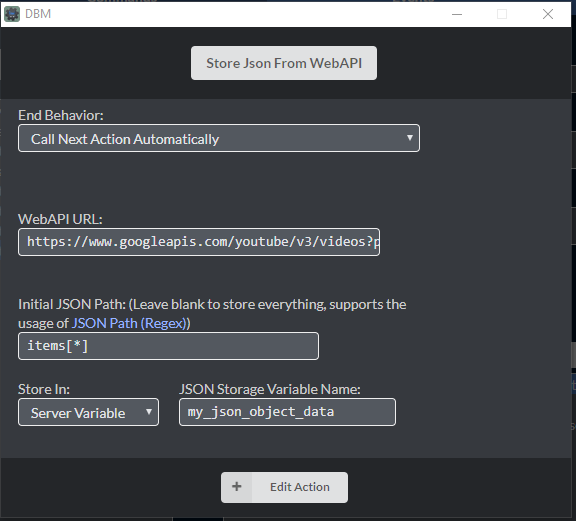
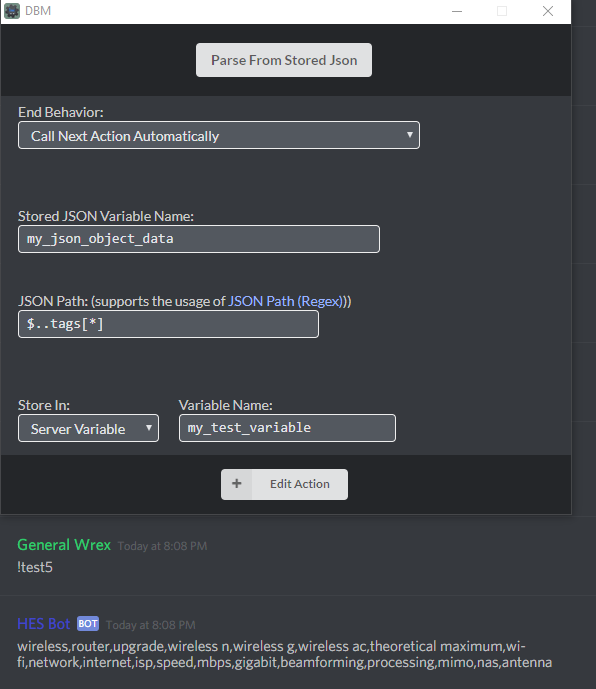
* Now supports the use of JsonPATH in both Store and Parse
WEBAPI - Using API Keys in google's json webapi is appending ?key=[keygoeshere] ** to the end of your Google API url, google how to create a API key in googles developer console for how to create a key**
A Helper program to get the JSON Path for this mod You can find it here! https://github.com/generalwrex/DBM-WebAPI-Parser-PathFinder
Find out more information about JSON Path here - http://goessner.net/articles/JsonPath/index.html#e2 Test it out here! http://jsonPath.com
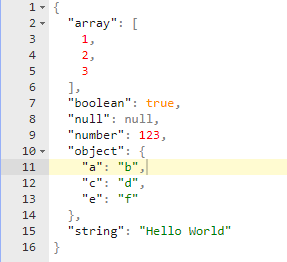
Here is our example
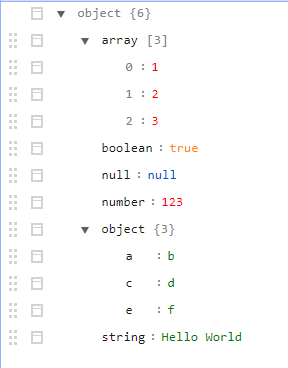
Interact with it here! https://jsonblob.com/
Lets say we wanted to get the "b" object from that ( the highlighted one )
the path to the "b" object would be "object.object.a"
the path to the "Hello World" string would be "object.string"
the path to the "123" would be "object.number"
To pull an object from the array, it would be object.array[0] for 1, array[1] for 2, and array[2] for 3" Instead of array.0 its array[0].
When typing these into the path, always ignore the root variable as thats already there.
so if you wanted the path to output "Hello World", you would type string into the path textbox. (removing object. from it)
Have fun!