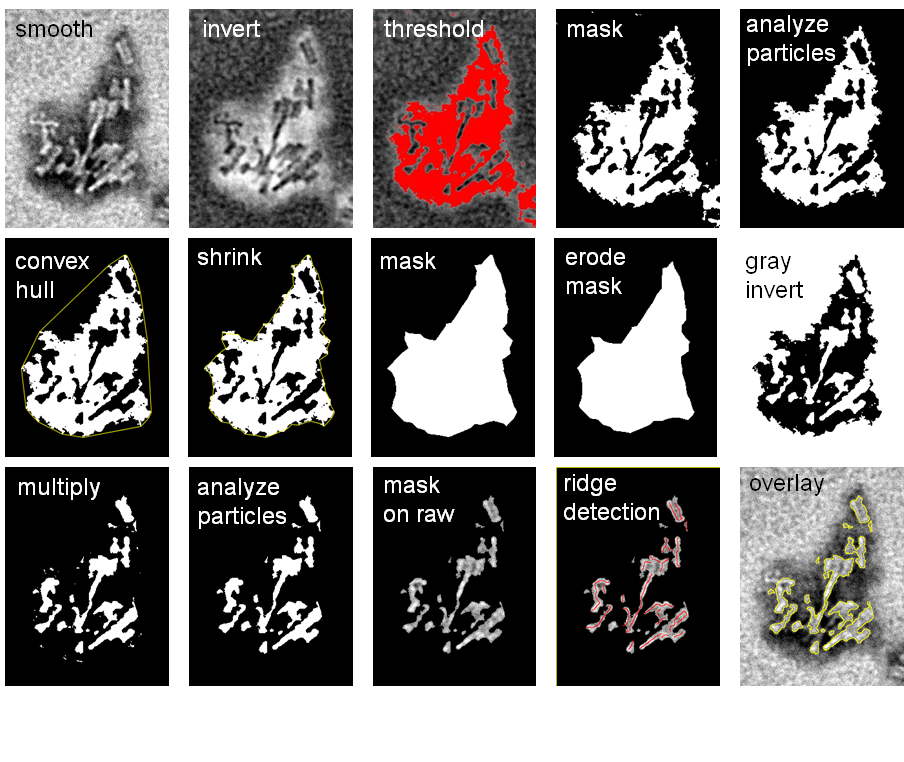
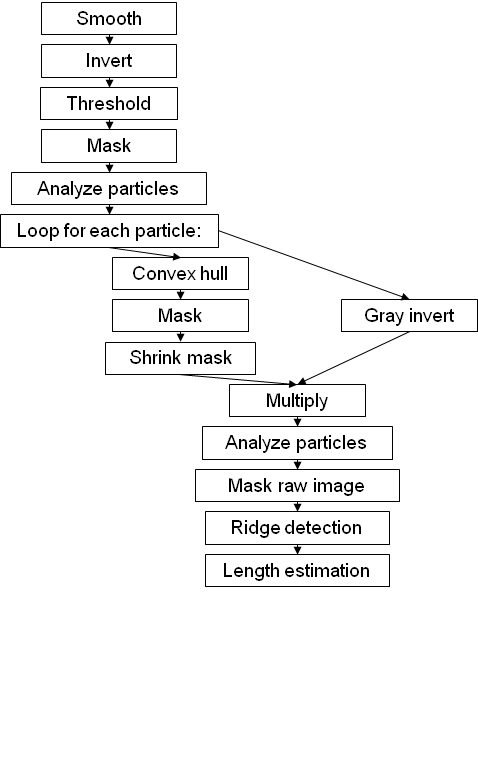
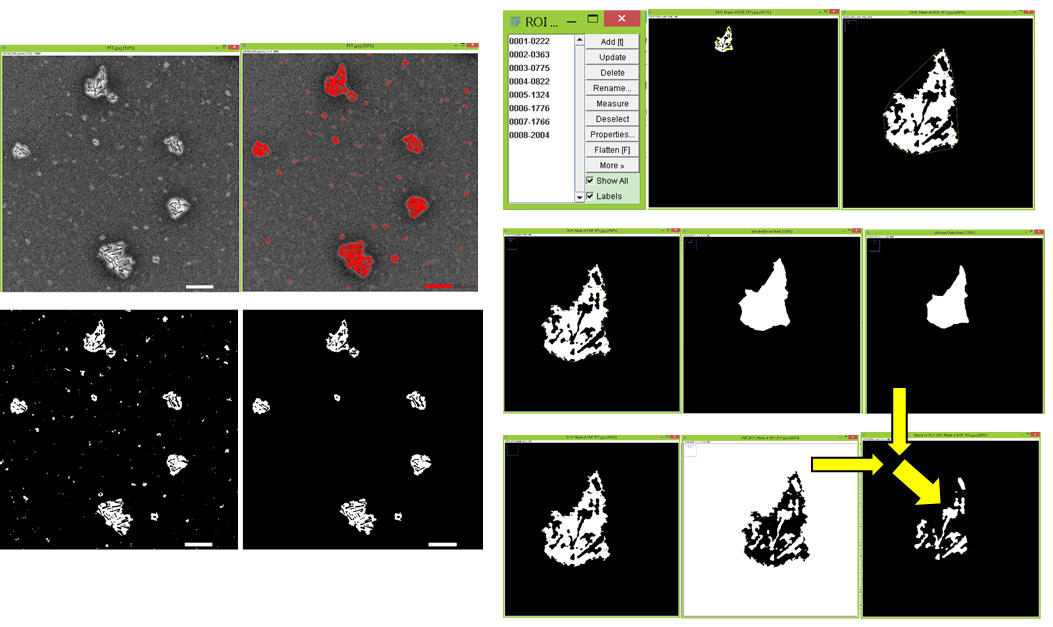
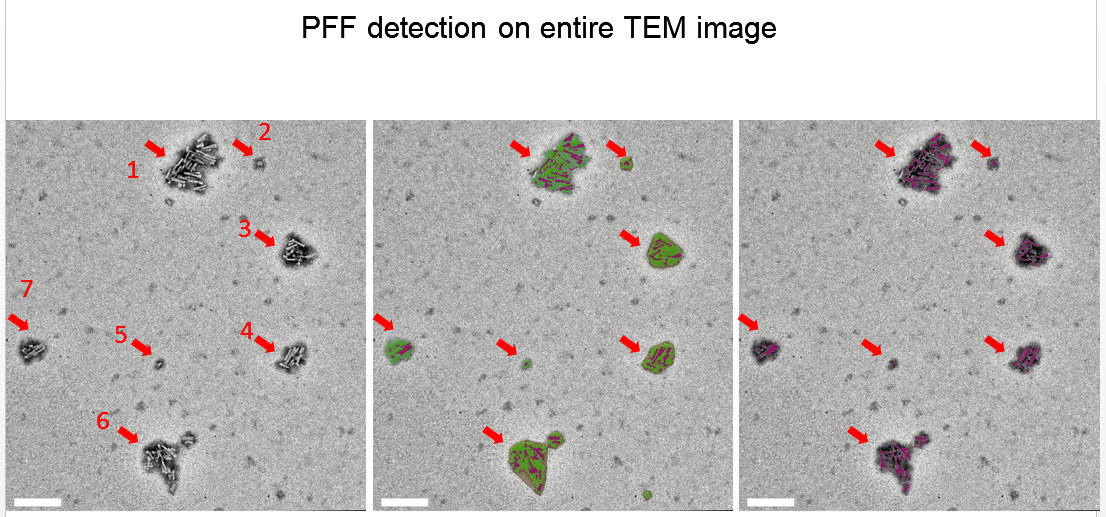
A programme to detect contour and measure lengths of sonicated PFF(α-syn preformed fibril) on TEM images.
Contributed by Ren Mengda from LKCMedicine and Barbara Wong WING YAN from The University of Hong Kong (HKU).
    #1.Installization and run
        1.1 install Fiji:
            --way A1: (not recommended as API may change in future, way A2 is better for compatibility)
                download and unzip from https://downloads.imagej.net/fiji/latest/fiji-win64.zip
                place ij_ridge_detect-1.4.0-J6Public.jar inside Fiji's installation .\Plugins folder.
            --way A2:(recommended, tested stable)
                download Fiji from this repo which already has ij_ridge_detect-1.4.0-J6Public.jar included.
            After install Fiji, place "IJ_Prefs.txt" to your user folder(if folder not exist, create the folder) as :
                C:\Users\(should be your pc username)\.imagej\IJ_Prefs.txt

        1.2 install python and spyder3 (and pyimagej by way 2)
            --way B1:(not recommended, prone to error/fail because of updates in pywin32 in 2021.)
                install Python3.6.6 from https://www.python.org/ftp/python/3.6.6/python-3.6.6-amd64.exe
                install spyder3.3.1 by commands 'pip install spyder==3.3.1' into command window.

            --way B2:(recommended) download the python zip file Python36.rar from this repo containig both python, Spyder3 and pyimagej.
                unzip as 'C:\\Users\(should be your pc account username)\AppData\Local\Programs\Python\Python36\...'
                then add 'C:\\Users\(should be your pc account username)\AppData\Local\Programs\Python\Python36\Scripts' to system environment Path
                then open 'C:\\Users\(should be your pc account username)\AppData\Local\Programs\Python\Python36\Scripts\spyder3.exe' in notepad++(install if not have)
                    search for string 'rmd', you will locate to a path:
                        c:\users\rmd\appdata\local\programs\python\python36\pythonw.exe
                    update the path to actual pythonw.exe, especially updating 'rmd' to your path equivalents of pc account username, then save the file.

        1.3 instalL OpenJDK8
            download https://cdn.azul.com/zulu/bin/zulu8.54.0.21-ca-fx-jdk8.0.292-win_x64.zip
            unzip to a folder, for example, unzip as D:\GreenSoft\zulu8.54.0.21-ca-fx-jdk8.0.292-win_x64,
            and add this folder to system environment 'Path'.

        1.4 install maven 3.8.1 or 3.8.3
            visit https://maven.apache.org/download.cgi
                or https://downloads.apache.org/maven/maven-3/3.8.1/binaries/apache-maven-3.8.1-bin.zip
            unzip to a folder, for example, unzip as D:\GreenSoft\apache-maven-3.8.1\bin
            add this folder to system environment 'Path'.
            test by launching cmd.exe, then run <mvn -v>. Note java jdk or jre, and JAVA_HOME environment path is required.
            if no java jdk or jre installed, install it and add to the environment path JAVA_HOME:
                either
                        (1,recommended)install a java jre or jdk such as install jdk as C:\Program Files\Java\jdk1.8.0_211
                        from this repo download and unzip jdk1.8.0_211 and move it, so that you will have C:\Program Files\Java\jdk1.8.0_211\bin\java.exe
                or
                        (2, not recommended) just use the java inside Fiji such as: D:\GreenSoft\Fiji.app52p\java\win64\jdk1.8.0_172

        1.5 (only if select --way B1) install pyimagej if pyimagej has not been installed .
            by commands 'pip install pyimagej' into windows command window.

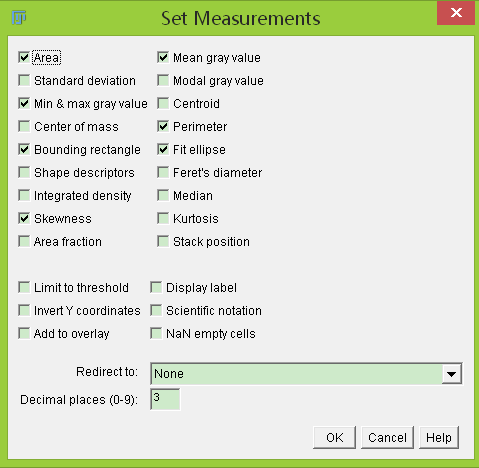
    #2. Run imagej, click Analyze-Set Measurement..., tick as image blow shows, then quit.

    #3. launch spyder3q GUI by input 'spyder3.exe' into windows command window and press enter.
        it usually localized in 'C:\\Users\~\AppData\Local\Programs\Python\Python36\Scripts\spyder3.exe'
        you can also right-click-and-drag a shortcut to your desk.

    #4. Open the newest version of script myPFFdetection(largest number).py in spyder3.
            edit the line in this script to change to your local Fiji application path.
                FijiAppPath = r"D:\\GreenSoft\\Fiji.app52p" # always change to your real Fiji installation path

    #5. then run the whole script in Spyder3:
        # click the green triangle button and wait for Fiji start.
        # after Fiji panel pop up, drag a random image you have to Fiji panel to open it, and click Analyze-Measure to see if the colums are the same as image blow shows.
            If not, click Analyze-Set Measurement..., tick as image blow shows and re-analyze to check.
        # Now click the green triangle button again to start processing images.
        # a panel for setting will show up for you to edit, if need.
        # For each image to analyze, there will be a pause at beginning, with a thresholding image for you to check and minor-adjust threshold,
            then input anything into spyder console(on right-bottom corner) and press enter to continue.

    #6. For each PFF clump roi, there will be a "_*_RoiCrop_Ridge.csv" generated, which contain the list of lengths(um) of all identified PFF filaments.
        It is advised to measure a minimum PFF length on image, and only consider the PFF lengths that are not less than this value for quantification.