Welcome to the Steganography project!
This Python-based program allows you to hide and reveal secret messages within images using the Least Significant Bit (LSB) technique. Additionally, for enhanced security, the hidden text is encrypted using the Fernet encryption method, ensuring that your data remains secure even if detected.
Steganography involves hiding a secret message within another medium, such as an image, without altering the medium's visual appearance. This project uses the Least Significant Bit (LSB) steganography technique, where the least significant bits of the image's pixels are modified to store the hidden data.
For example:
- Original Image
- Encrypted Image
Despite containing hidden text, the image appears identical to the original, making the hidden message undetectable to the naked eye.
When we talk about a "digital image," we're referring to a picture made up of tiny dots called pixels. These pixels are arranged in a grid, much like a mosaic, to create the image you see. Digital images come in different formats (like JPEG, PNG, etc.), but the basic idea is the same: a grid of pixels with specific colors.
A pixel is the smallest part of an image. Each pixel holds information about its color, and the more pixels an image has, the clearer it appears. The color of each pixel can change, which means more detailed pictures have more pixels.

In digital images, colors are usually represented using the RGB color model, which stands for Red, Green, and Blue. Each pixel in an RGB image is defined by three numbers:
- Red value
- Green value
- Blue value
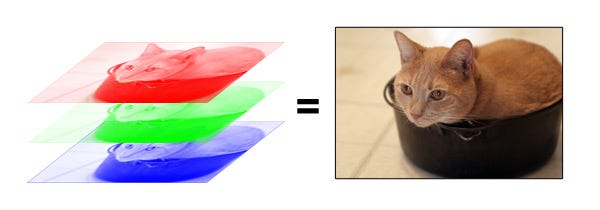
Each of these values can range from 0 to 255. So, a pixel in an image might look like this:
- Red: 75
- Green: 154
- Blue: 233
This combination creates a specific color.

Computers use binary numbers (1s and 0s) to store information. Each RGB value (ranging from 0 to 255) can be written as an 8-bit binary number. For example:
- 75 in binary is 1001011
- 154 in binary is 10011010
- 233 in binary is 11101001
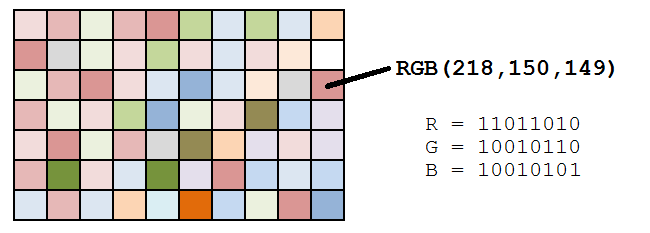
In an 8-bit binary number, each digit has a different impact on the final value:
-
Most Significant Bit (MSB): The leftmost digit, which has the largest impact. Changing it can drastically change the color.
-
Least Significant Bit (LSB): The rightmost digit, which has the smallest impact. Changing it only slightly changes the color, often in a way that isn’t noticeable.

LSB Steganography is a technique that hides information inside an image by altering the LSBs of the pixels.
Hiding Information:
To hide a secret message in an image, you can change the LSB of each pixel’s color value to match the binary code of the message. Since changing the LSB only slightly alters the color, the image will look almost the same to the human eye, but it now contains hidden information. Example:
- Original Pixel: (Red: 200, Green: 173, Blue: 227)
- Binary: (11001000, 10101101, 11100011) After Hiding "1" in Each LSB:
- Modified Pixel: (Red: 201, Green: 172, Blue: 226)
- Binary: (11001001, 10101100, 11100010)
The change is so small that it’s hard to notice, but now the image contains a hidden message.
By slightly altering the LSBs of Original Image’s pixels, you can hide text inside it.
- Original Image:

- Encrypted Image:(Image with a hidden text)

Even though the image now contains a text, it still looks very similar to the original.
Extracting the Hidden Image
To reveal the hidden text from the altered Image, you reverse the process. Extract the LSBs from Original Image’s pixels. Combine them to reconstruct Image B.
- To get started, clone the repository:
git clone https://github.com/nivedhapm/Steganography-Project.git
cd Steganography-Project- Install the required Python libraries:
pip install -r requirements.txt- Run the program:
- For encoding a message:
encoder.py- For decoding a message:
decoder.py