A modern, responsive developer portfolio showcasing skills, projects, and professional experience. Built with cutting-edge web technologies and optimized for performance.
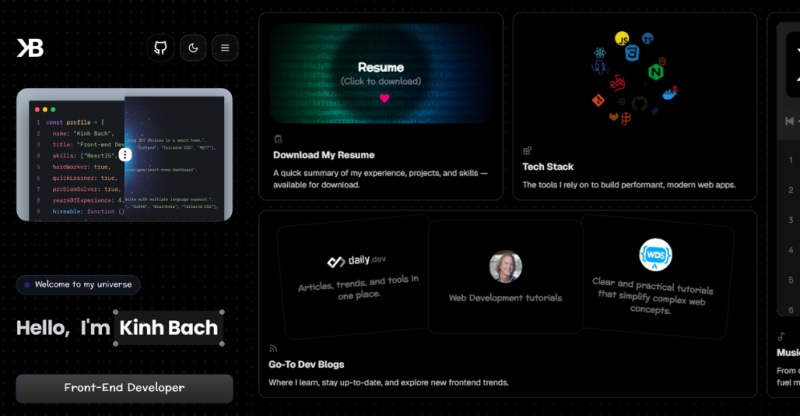

- Light/Dark: Switch between light and dark themes with smooth transitions
- Modern Design: Clean, professional interface with smooth animations
- Fully Responsive: Optimized for all devices and screen sizes
- Performance Optimized: Fast loading times with optimized assets
- Interactive Elements: Engaging user experience with smooth transitions
- SEO Friendly: Optimized for search engines
- Accessibility: Built with accessibility best practices
- Project Showcase: Dynamic project gallery with detailed descriptions
- Skills Visualization: Interactive skills and technology display
- Spotify Integration: Embedded playlist with theme-aware styling
- ⚛️ Framework: Next.js 15+
- 🎨 Styling: Tailwind CSS
- 🌀 Animations: Framer Motion
- 🧩 UI Components: shadcn/ui • MagicUI • AceternityUI
- 🔣 Icons: Lucide React • Tabler Icons
- 🔤 Typography: Custom Google Fonts
Before you begin, ensure you have the following installed:
- Node.js (version 18.0 or higher)
- npm / yarn / pnpm
- Git
git clone https://github.com/kinhdev24/kinhdev24-portfolio.git
cd kinhdev24-portfolio# Using npm
npm install
# Using yarn
yarn install
# Using pnpm
pnpm installCreate a .env.local file in the root directory:
# Spotify Playlist Integration
NEXT_PUBLIC_SPOTIFY_PLAYLIST_ID=your_playlist_id_here# Using npm
npm run dev
# Using yarn
yarn dev
# Using pnpm
pnpm devOpen http://localhost:3000 to view the portfolio in your browser.
This portfolio features an embedded Spotify playlist that adapts to the current theme (dark/light mode).
-
Get Your Spotify Playlist ID:
- Open your Spotify playlist in the web player
- Copy the playlist URL (e.g.,
https://open.spotify.com/playlist/677KIyayzcVJeA77I9hEi0) - Extract the playlist ID from the URL (the part after
/playlist/)
-
Configure Environment Variable:
NEXT_PUBLIC_SPOTIFY_PLAYLIST_ID=your_playlist_id_here
-
Implementation Example:
// Theme-aware Spotify embed
<iframe
  src={`https://open.spotify.com/embed/playlist/${
    process.env.NEXT_PUBLIC_SPOTIFY_PLAYLIST_ID
  }?utm_source=generator&theme=${currentTheme === "dark" ? "0" : "1"}`}
  width="100%"
  height="352"
  frameBorder="0"
  allowtransparency="true"
  allow="autoplay; clipboard-write; encrypted-media; fullscreen; picture-in-picture"
  loading="lazy"
/>
- Theme Integration: Automatically switches between dark (theme=0) and light (theme=1) modes
- Responsive Design: Adapts to different screen sizes
- Performance: Lazy loading for better page performance
- User Experience: Seamless integration with portfolio theme
theme=0- Dark themetheme=1- Light themeutm_source=generator- Required parameter for embedded playlists
Playlist Not Loading:
- Ensure the playlist is set to public
- Verify the playlist ID is correct
- Check that the Spotify embed URL is properly formatted
Theme Not Switching:
- Confirm the theme state is being passed correctly
- Verify the conditional logic for theme values (0 for dark, 1 for light)
Edit the following files to customize with your information:
- My Social Networks:
src/data/my-networks.ts - Role Titles:
src/data/role-titles.ts - Resume File:
public/file/kinhbach_resume.ts - Experience:
src/data/experience.tsx - Projects:
src/data/projects.ts - Tech Stacks:
src/data/tech-stack.ts - Learning Resource:
src/data/learning-resource.ts
- Colors: Modify
tailwind.config.jsfor custom color schemes - Fonts: Update font imports in
src/app/layout.tsx - Components: Customize components in
src/components/
src/
├── components/          # Reusable UI components
│   ├── ui/             # Basic UI components
│   ├── sections/       # Page sections (Hero, About, Projects, etc.)
│   └── layout/         # Layout components (Header, Footer)
├── data/               # Static data files
├── lib/                # Utility functions
├── styles/             # Global styles
└── app/                # Next.js app directory
kinhdev24-portfolio/
├── public/             # Static assets
│   ├── images/         # Images and media
│   ├── icons/          # Favicon and icons
│   └── resume.pdf      # Downloadable resume
├── src/
│   ├── app/            # Next.js app router
│   ├── components/     # React components
│   ├── data/           # Static data
│   ├── lib/            # Utilities
│   └── styles/         # CSS files
├── .env.local          # Environment variables
├── next.config.js      # Next.js configuration
├── tailwind.config.js  # Tailwind CSS configuration
└── package.json        # Dependencies and scripts
- Fork this repository
- Connect your GitHub account to Vercel
- Import your forked repository
- Configure environment variables
- Deploy!
- Netlify: Connect your GitHub repo and deploy
- GitHub Pages: Use
npm run buildandnpm run export - Custom Server: Build with
npm run buildand serve theout/directory
- Mobile: < 640px
- Tablet: 640px - 1024px
- Desktop: > 1024px
- Large Desktop: > 1440px
- Image Optimization: Next.js automatic image optimization
- Code Splitting: Automatic code splitting for optimal loading
- Static Generation: Pre-rendered pages for faster loading
- Lazy Loading: Components and images loaded on demand
- Bundle Analysis: Use
npm run analyzeto analyze bundle size
npm run dev- Start development servernpm run build- Build for productionnpm run start- Start production servernpm run lint- Run ESLint
Contributions are welcome! Please follow these steps:
- Fork the repository
- Create a feature branch (
git checkout -b feature/amazing-feature) - Commit your changes (
git commit -m 'Add amazing feature') - Push to the branch (
git push origin feature/amazing-feature) - Open a Pull Request
- Follow the existing code style
- Write clear commit messages
- Add tests for new features
- Update documentation as needed
- Ensure all tests pass before submitting
If you find a bug, please create an issue with:
- Clear description of the problem
- Steps to reproduce
- Expected vs actual behavior
- Screenshots (if applicable)
- Browser and device information
[Bach Duong Kinh]
- GitHub: @kinhdev24
- LinkedIn: @kinhdev24
- Email: [email protected]
- Website: kinhdev.id.vn
- Next.js - React framework
- Tailwind CSS - Utility-first CSS framework
- Framer Motion - Animation library
- Vercel - Deployment platform
- Lucide - Icon library
- Tabler - Icon library
- shadcn/ui - UI components
- MagicUI - Animation presets
- AceternityUI - Animated UI components
Build Errors
# Clear cache and reinstall dependencies

# Using npm
rm -rf .next node_modules package-lock.json
npm install

# Using yarn
rm -rf .next node_modules yarn.lock
yarn cache clean
yarn install

# Using pnpm
rm -rf .next node_modules pnpm-lock.yaml
pnpm store prune
pnpm install
Environment Variables Not Loading
- Ensure
.env.localfile is in the root directory - Restart the development server after adding new variables
- Check that variable names start with
NEXT_PUBLIC_for client-side access
Spotify Playlist Not Displaying
- Verify the playlist is public in Spotify
- Check the playlist ID in your environment variables
- Ensure the embed URL is correctly formatted
- Test the playlist URL directly in browser
Styling Issues
- Ensure Tailwind CSS is properly configured
- Check for conflicting CSS classes
- Verify responsive breakpoints
- Implement blog functionality
- Add project filtering and search
- Add multi-language support
- Implement advanced animations
- Add project case studies
- Integrate testimonials section
⭐ If you found this project useful, please consider giving it a star on GitHub!
Made with ❤️ by kinhdev24
