Releases: generalwrex/DBM-WebAPI-Parser-PathFinder
PathFinder V1.0.1

This program should work on Windows Versions 8.1 - 10+
Changes
- Fixed a bug that was causing the path to appear reversed
- Updated the icon
- Help button correctly links back to this repository.
Instructions
Extract the ZIP Archive and run PathFinder.exe.
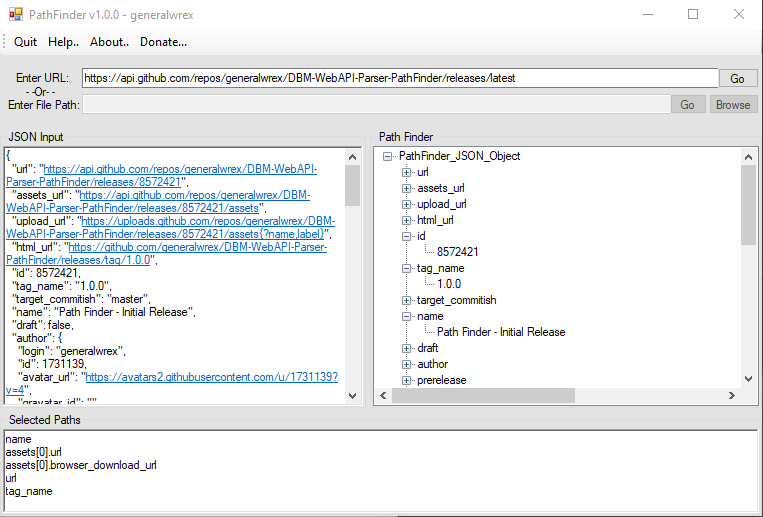
Paste a URL containing a link that returns JSON Data into the Enter URL textbox and hit Enter or click Go.
Or
Paste JSON Data in the JSON Input textbox on the left and hit Enter.
The Path Finder box on the right side will fill up with a a tree styled list with the same structure as
the JSON Data. To add a path Double Click on the Value that you would want to add to your action and the JSON Path will appear in the Selected Paths textbox on the bottom, one per line.
Copy a single line from the Selected Paths and enter it into the Path variable in the WebAPI Parser Action.
Path Finder - Initial Release
This program should work on Windows Versions 8.1 - 10+
Instructions
Extract the ZIP Archive and run PathFinder.exe.
Paste a URL containing a link that returns JSON Data into the Enter URL textbox and hit Enter or click Go.
Or
Paste JSON Data in the JSON Input textbox on the left and hit Enter.
The Path Finder box on the right side will fill up with a a tree styled list with the same structure as
the JSON Data. To add a path Double Click on the Value that you would want to add to your action and the JSON Path will appear in the Selected Paths textbox on the bottom, one per line.
Copy a single line from the Selected Paths and enter it into the Path variable in the WebAPI Parser Action.
release removed from old version, use the latest one