Skip to content

220 help button graph editing features#229

Merged
fsoupimenta merged 8 commits into
mainfrom
220-help-button-graph-editing-features
Feb 8, 2023
Merged

220 help button graph editing features#229
fsoupimenta merged 8 commits into
mainfrom
220-help-button-graph-editing-features

Conversation

@fsoupimenta

Copy link
Copy Markdown
Member

Closes #220

@atilaajones atilaajones left a comment

Copy link
Copy Markdown
Contributor

Choose a reason for hiding this comment

The reason will be displayed to describe this comment to others. Learn more.

We can imporove the layout of the text. I suggest try to design a table, with two columns: Keymap and function.

Look this site: Table generator

@atilaajones atilaajones left a comment

Copy link
Copy Markdown
Contributor

Choose a reason for hiding this comment

The reason will be displayed to describe this comment to others. Learn more.

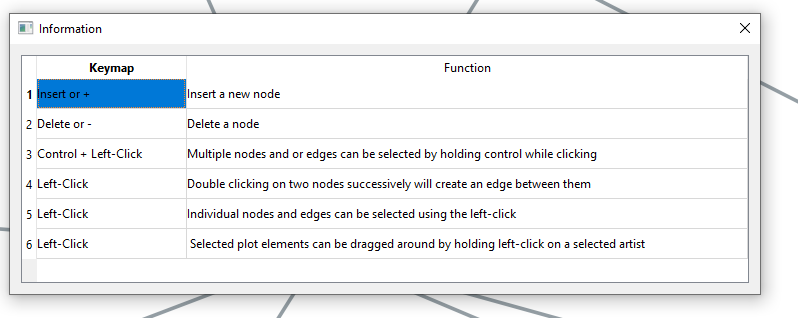
The table inserted was using pyqt5, which is not ideal. It allows selection (image attached) and a visual that gives the feeling that it has functionality in the window.

I think it's enough just a text table in html. This table you can generate by table generator

OBS: I think the "graph editing features" text could be closer to the button.
image

@fsoupimenta

Copy link
Copy Markdown
Member Author

I solved these "selection" problems and also removed the column with the row numbering, but i cannot change the headers style.

Regarding the spacing of the "Graph editing features" label on the toolbar, the spacing logic has to be changed

@fsoupimenta fsoupimenta merged commit 5dd378c into main Feb 8, 2023
@fsoupimenta fsoupimenta deleted the 220-help-button-graph-editing-features branch February 23, 2023 23:10
Sign up for free to join this conversation on GitHub. Already have an account? Sign in to comment

Labels

None yet

Projects

None yet

Development

Successfully merging this pull request may close these issues.

Help Button: Graph editing features

3 participants