|
1 | 1 |
|
2 | 2 | #DCPathButton 2.0 |
3 | 3 |
|
4 | | -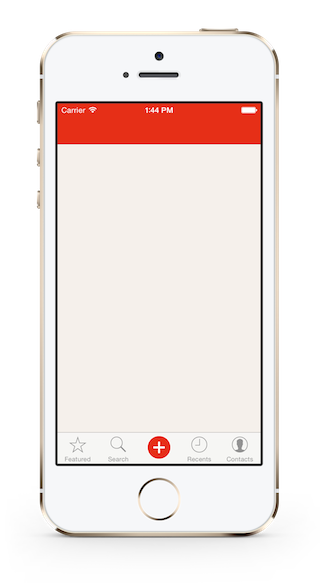 |
5 | | -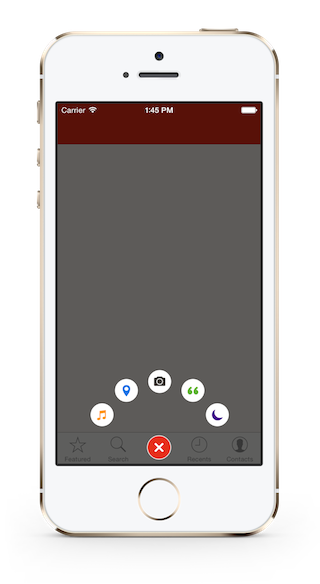 |
| 4 | +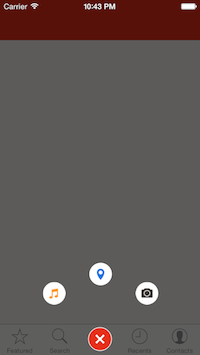. |
| 5 | +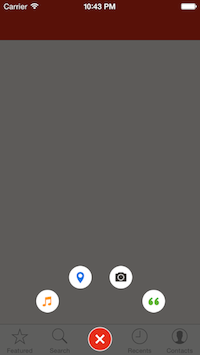. |
| 6 | +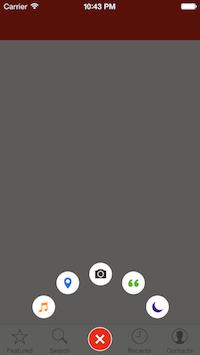 |
6 | 7 |
|
7 | | - |
8 | | -DCPathButton 2.0 is a menu button for iOS. Designed by a famous iOS App [**Path**](path.com). |
9 | | -Since **Path 4.0**, this beautiful button was moved into the tab bar, with a new design. |
10 | | -So the **DCPathButton** is totally a copy, including the **animations**, the **sounds** and the **button's images** ( *of cource you can use your own images* ). |
11 | | - |
12 | | -## How To Get Started |
13 | | - |
14 | | -- Download [**DCPathButton**](https://codeload.github.com/Tangdixi/DCPathButton/zip/master) |
15 | | -- Clone **DCPathButton** |
16 | | - |
17 | | -```bash |
18 | | -git clone [email protected]:Tangdixi/DCPathButton.git |
19 | | -``` |
20 | | - |
21 | | -##Installation |
22 | | - |
23 | | -Of cource, you can install **DCPathButton** in a traditional way -- drag the **DCPathButton** folder into your projects. but I strongly recommanded that you install from **CocoaPods** |
24 | | - |
25 | | -##Install with CocoaPods |
26 | | -[CocoaPods](http://cocoapods.org) is a dependency manager for Objective-C, which automates and simplifies the process of using 3rd-party libraries like **DCPathButton** in your projects. |
27 | | - |
28 | | -####Podfile |
29 | | -```bash |
30 | | -platform :ios, '7.0' |
31 | | -pod 'DCPathButton', '~> 2.0' |
32 | | -``` |
33 | | - |
34 | | -##Usage |
35 | | - |
36 | | -1. import the "DCPathButton" to your controller |
37 | | -```objc |
38 | | -import "DCPathButton.h" |
39 | | -``` |
40 | | -2. Add the `DCPathButtonDelegate` to your controller |
41 | | -```objc |
42 | | -@interface ViewController ()<DCPathButtonDelegate> |
43 | | -``` |
44 | | -3. |
45 | | -======= |
46 | 8 | DCPathButton 2.0 is a menu button for iOS. Designed by a famous iOS App [**Path**](path.com). |
47 | 9 | Since **Path 4.0**, this beautiful button was moved into the tab bar, with a new design. |
48 | 10 | So the **DCPathButton** is totally a copy, including the **animations**, the **sounds** and the **button's images** ( *of cource you can use your own images* ). |
@@ -76,105 +38,8 @@ pod 'DCPathButton', '~> 2.0' |
76 | 38 |
|
77 | 39 | ##Usage |
78 | 40 |
|
79 | | -####Create a DCPathButton |
80 | | -1.import the "DCPathButton" to your controller |
81 | | -```objc |
82 | | -import "DCPathButton.h" |
83 | | -``` |
84 | | -2.Add the `DCPathButtonDelegate` to your controller |
85 | | -```objc |
86 | | -@interface ViewController ()<DCPathButtonDelegate> |
87 | | -``` |
88 | | -3.Create a center button and add it into your view |
89 | | -```objc |
90 | | -DCPatButton *centerButton = [[DCPathButton alloc]initWithCenterImage:[UIImage imageNamed:@"chooser-button-tab"] |
91 | | - hilightedImage:[UIImage imageNamed:@"chooser-button-tab-highlighted"]]; |
92 | | -[self.view addSubView:centerButton]; |
93 | | -``` |
94 | | -4.Create some item buttons and add them into the center button |
95 | | -```objc |
96 | | - DCPathItemButton *itemButton_1 = [[DCPathItemButton alloc]initWithImage:[UIImage imageNamed:@"image"] |
97 | | - highlightedImage:[UIImage imageNamed:@"highlightedImage"] |
98 | | - backgroundImage:[UIImage imageNamed:@"backgroundImage"] |
99 | | - backgroundHighlightedImage:[UIImage imageNamed:@"backgroundhighlightedImage"]]; |
100 | | - |
101 | | -[centerButton addPathItems:@[itemButton_1]]; |
102 | | -``` |
103 | | -####DCPathButtonDelegate |
104 | | -
|
105 | | -The **DCPathButtonDelegate** handle the action when you fire the item buttons which is similar to the **UITableViewDelegate**, control the items through the **index** |
106 | | -
|
107 | | -You can add one item at least or five items at most. Let's assume we have five items, so the **index** is 0 to 4 :) |
| 41 | +####Create a DCPathButton |
108 | 42 |
|
109 | | -```objc |
110 | | -- (void)itemButtonTappedAtIndex:(NSUInteger)index |
111 | | -{ |
112 | | - if(index == 0){ |
113 | | - // When the user tap index 1 here ... |
114 | | - } |
115 | | - else{ |
116 | | - // other code here ... |
117 | | - } |
118 | | -} |
119 | | -``` |
120 | | - |
121 | | -##Custom Property |
122 | | - |
123 | | -```objc |
124 | | -@property (assign, nonatomic) CGFloat bloomRadius; |
125 | | -``` |
126 | | - |
127 | | -`bloomRadius` is use to handle the item button bloom radius, default is `105.0f`; |
128 | | - |
129 | | -Now there is only one public `property` in **DCPathButton**. :| |
130 | | -If you want more DIY. Just open an issue, tell me what you want. :) |
131 | | - |
132 | | -##Problems, bugs or advice |
133 | | - |
134 | | -Open an [issue](https://github.com/Tangdixi/DCPathButton/issues) guys :) |
135 | | -I will reply you as quickly as I can . |
136 | | - |
137 | | -##Lisence |
138 | | - |
139 | | -**DCPathButton** is available under the MIT license. See the LICENSE file for more info. |
140 | | - |
141 | | - |
142 | | ->>>>>>> 125c62ec9e650d062e0c0e3ebbcf44975dd8cb2c |
143 | | -======= |
144 | | -DCPathButton 2.0 is a menu button for iOS. Designed by a famous iOS App [**Path**](path.com). |
145 | | -Since **Path 4.0**, this beautiful button was moved into the tab bar, with a new design. |
146 | | -So the **DCPathButton** is totally a copy, including the **animations**, the **sounds** and the **button's images** ( *of cource you can use your own images* ). |
147 | | - |
148 | | -## How To Get Started |
149 | | - |
150 | | -- Download [**DCPathButton**](https://codeload.github.com/Tangdixi/DCPathButton/zip/master) |
151 | | -- Clone **DCPathButton** |
152 | | - |
153 | | -```bash |
154 | | -git clone [email protected]:Tangdixi/DCPathButton.git |
155 | | -``` |
156 | | - |
157 | | -##Installation |
158 | | - |
159 | | -Of cource, you can install **DCPathButton** in a traditional way -- drag the **DCPathButton** folder into your projects. but I strongly recommanded that you install from **CocoaPods** |
160 | | - |
161 | | -####Requirement |
162 | | - |
163 | | -- **AudioToolBox.framework** |
164 | | -- **QuartzCore.framework** |
165 | | - |
166 | | -##Install with CocoaPods |
167 | | -[CocoaPods](http://cocoapods.org) is a dependency manager for Objective-C, which automates and simplifies the process of using 3rd-party libraries like **DCPathButton** in your projects. |
168 | | - |
169 | | -####Podfile |
170 | | -```bash |
171 | | -platform :ios, '7.0' |
172 | | -pod 'DCPathButton', '~> 2.0' |
173 | | -``` |
174 | | - |
175 | | -##Usage |
176 | | - |
177 | | -####Create a DCPathButton |
178 | 43 | 1.import the "DCPathButton" to your controller |
179 | 44 | ```objc |
180 | 45 | import "DCPathButton.h" |
@@ -224,17 +89,15 @@ You can add one item at least or five items at most. Let's assume we have five i |
224 | 89 |
|
225 | 90 | `bloomRadius` is use to handle the item button bloom radius, default is `105.0f`; |
226 | 91 |
|
227 | | -Now there is only one public `property` in **DCPathButton**. :| |
228 | | -If you want more DIY. Just open an issue, tell me what you want. :) |
| 92 | +Now there is only one public `property` in **DCPathButton**. :| |
| 93 | +If you want more DIY. Just open an [issue](https://github.com/Tangdixi/DCPathButton/issues), tell me what you want. :) |
229 | 94 |
|
230 | 95 | ##Problems, bugs or advice |
231 | 96 |
|
232 | | -Open an [issue](https://github.com/Tangdixi/DCPathButton/issues) guys :) |
| 97 | +Open an [issue](https://github.com/Tangdixi/DCPathButton/issues) guys :) |
233 | 98 | I will reply you as quickly as I can . |
234 | 99 |
|
235 | 100 | ##Lisence |
236 | 101 |
|
237 | 102 | **DCPathButton** is available under the MIT license. See the LICENSE file for more info. |
238 | 103 |
|
239 | | - |
240 | | ->>>>>>> 125c62ec9e650d062e0c0e3ebbcf44975dd8cb2c |

0 commit comments