

Common issues
SqliteException: Could not load extension or similar
This client-side error or similar typically occurs when PowerSync is used in conjunction with either another SQLite library or the standard system SQLite library. PowerSync is generally not compatible with multiple SQLite sources. If another SQLite library exists in your project dependencies, remove it if it is not required. In some cases, there might be other workarounds. For example, in Flutter projects, we’ve seen this issue with sqflite 2.2.6, but sqflite 2.3.3+1 does not throw the same exception.
RangeError: Maximum call stack size exceeded on iOS or Safari
This client-side error commonly occurs when using the PowerSync Web SDK on Safari or iOS (including iOS simulator).
Solutions:
- Use OPFSCoopSyncVFS (Recommended): Switch to the
OPFSCoopSyncVFSvirtual file system, which provides better Safari compatibility and multi-tab support:
- Disable Web Workers (Alternative): Set the
useWebWorkerflag tofalse, but note that this disables multi-tab support:
Too Many Buckets (PSYNC_S2305)
PowerSync uses internal partitions called buckets to organize and sync data efficiently. There is a default limit of 1,000 buckets per user/client. When this limit is exceeded, you will see a PSYNC_S2305 error in your PowerSync Service API logs.
How buckets are created in Sync Streams
The number of buckets a stream creates for a given user depends on how your query filters data. The general rule is: one bucket is created per unique value of the filter expression — whether a subquery result, a JOIN, an auth parameter, or a subscription parameter. The 1,000 limit applies to the total across all active streams for a single user. Examples below use a common schema:| Query pattern | Buckets per user |
|---|---|
No parameters: SELECT * FROM regions | 1 global bucket, shared by all users |
Direct auth filter only: WHERE user_id = auth.user_id() | 1 per user |
JWT array parameter: WHERE project_id IN auth.parameter('project_ids') | N - one per value in the JWT array |
Subscription parameter: WHERE project_id = subscription.parameter('project_id') | 1 per unique parameter value the client subscribes with |
Subquery returning N rows: WHERE id IN (SELECT org_id FROM org_membership WHERE user_id = auth.user_id()) | N — one per result row of the subquery |
Combined subquery + subscription parameter: WHERE org_id IN (SELECT org_id FROM org_membership WHERE user_id = auth.user_id()) AND region = subscription.parameter('region') | N × M — one per (org_id, region) pair |
INNER JOIN through an intermediate table: SELECT tasks.* FROM tasks JOIN projects ON tasks.project_id = projects.id WHERE projects.org_id IN (...) | N — one per row of the joined table (one per project) |
Many-to-many JOIN: SELECT assets.* FROM assets JOIN project_assets ON project_assets.asset_id = assets.id WHERE project_assets.project_id IN (...) | N — one per asset row (not per project_assets row) |
WHERE id IN (SELECT org_id FROM org_membership WHERE ...), each org_id returned is one bucket key. For a one-to-many JOIN like SELECT tasks.* FROM tasks JOIN projects ON ..., each project row in the join produces one bucket for tasks.
For a many-to-many JOIN (e.g., SELECT assets.* FROM assets JOIN project_assets ON project_assets.asset_id = assets.id), the bucket key is each assets.id that passes the filter.
When a query combines two independent filter expressions — such as an IN subquery returning N rows and a subscription parameter with M distinct values — the bucket count multiplies to N × M, one per unique combination.
Hierarchical or chained queries are another source of bucket growth. Each query in a stream is indexed by the CTE it uses, and each unique value that CTE returns becomes a separate bucket key. Queries using different CTEs always create separate sets of buckets. Queries using the same CTE within a stream may share buckets.
For example, consider the following stream:
| Query | CTE used | Bucket keys | Buckets |
|---|---|---|---|
orgs | user_orgs | org-A, org-B | 2 |
projects | user_projects | proj-1 … proj-6 | 6 |
tasks | user_projects (shared with projects) | proj-1 … proj-6 | 0 extra |
| Total | 8 |
Diagnosing which streams are contributing
-
The
PSYNC_S2305error log includes a breakdown showing which stream definitions are contributing the most bucket instances (top 10 by count). -
PowerSync Service checkpoint logs record the total parameter result count per connection. You can find these in your instance logs. For example:
buckets— total number of active buckets for this connectionparam_results— the total parameter result count across all stream definitions for this connection- The array lists the active bucket names and the value in
[...]is the evaluated parameter for that bucket
- The Sync Diagnostics Client lets you inspect the buckets for a specific user, but note that it will not load for users who have exceeded the bucket limit since their sync connection fails before data can be retrieved. Use the instance logs and error breakdown to diagnose those cases.
Reducing bucket count in Sync Streams
Consolidate streams using multiple queries per stream
Consolidate streams using multiple queries per stream
Using After: 1 stream with 5 queries → 1 bucket per user:
queries instead of query groups related tables into a single stream. All queries in that stream share one bucket per unique evaluated parameter value. See multiple queries per stream.Before: 5 separate streams, each with direct auth.user_id() filter → 5 buckets per user:Query the membership table directly instead of through it
Query the membership table directly instead of through it
When a subquery or JOIN through a membership table is causing N buckets, update the query to target the membership table directly with a direct auth filter, with no subquery and no JOIN. You will typically need fields from the related table (e.g., org name, address) alongside each membership row; denormalize those fields onto the membership table so everything is available without introducing a JOIN.Before: N org memberships → N buckets:After: 1 bucket per user (with org fields denormalized onto
org_membership):Denormalize for hierarchical data
Denormalize for hierarchical data
When chained queries through parent-child relationships (e.g., org → project → task) create too many buckets, filter all tables with the same top-level parameter (e.g., After: Add
org_id). This only works if child tables have that column. If tasks only have project_id, add org_id to the tasks table.Before: 3 chained queries → 10 + 500 = 510 buckets for 10 orgs with 50 projects each (projects and tasks share buckets since they use the same CTE, but orgs and projects use different CTEs and do not):org_id to tasks, flatten to one bucket per org → 10 buckets:Many-to-many via denormalization
Many-to-many via denormalization
For assets ↔ projects via After: Add The
project_assets, buckets follow the primary table — one per asset.The solution is to add a denormalized project_ids JSON array column to assets (maintained via database triggers) and use json_each() to traverse it. This lets PowerSync partition by project ID instead of asset ID.Before: One bucket per asset (e.g., 2,000 assets → 2,000 buckets):project_ids to assets, partition by project → 50 buckets for 50 projects:INNER JOIN user_projects ensures only assets that belong to at least one of the user’s projects are synced. Bucket key is the project ID, so the bucket count matches the number of projects, not assets.Alternatively, use two queries in the same stream: one for project_assets filtered by user_projects, and one for assets with no project filter. The client joins locally. The significant trade-off is that the assets query has no way to scope to the user’s projects — it syncs all assets, which may be a dealbreaker depending on data volume.Restructure to use subscription parameters
Restructure to use subscription parameters
Buckets are only created per active client subscription, not from all possible values. Use After: Client subscribes per project on demand → 1 bucket per active subscription (e.g., 3 projects open = 3 buckets):This requires client code to subscribe when the user opens a project and unsubscribe when they leave. It is only practical when users don’t need all related records available simultaneously.
subscription.parameter('project_id') so the count is bounded by how many subscriptions the client has active.Before: Subquery returns all user projects → 50 buckets for 50 projects:Increasing the limit
The default of 1,000 can be increased upon request for Team and Enterprise customers. For self-hosted deployments, configuremax_parameter_query_results in the API service config. The limit applies per individual user — your PowerSync Service instance can track far more buckets in total across all users.
Before requesting a higher limit, consider the performance implications. Incremental sync overhead scales roughly linearly with the number of buckets per user. Doubling the bucket count approximately doubles sync latency for a single operation and doubles CPU and memory usage on both the server and the client. By contrast, having many operations within a single bucket scales much more efficiently. The 1,000 default exists both to encourage sync configs that use fewer, larger buckets and to protect the PowerSyncService from the overhead of excessive bucket counts. We recommend increasing the limit only after exhausting the reduction strategies above.
Tools
Troubleshooting techniques depend on the type of issue:- Connection issues between client and server: See the tools below.
- Expected data not appearing on device: See the tools below.
- Data lagging behind on PowerSync Service: Data on the PowerSync Service instance cannot currently directly be inspected. This is something we are investigating.
- Writes to the backend source database are failing: PowerSync is not actively involved: use normal debugging techniques (server-side logging; client and server-side error tracking).
- Updates are slow to sync, or queries run slow: See Performance
Sync Diagnostics Client
Access the Sync Diagnostics Client here: https://diagnostics-app.powersync.com This is a standalone web app that presents data from the perspective of a specific user. It can be used to:- See stats about the user’s local database.
- Inspect tables, rows and buckets on the device.
- Query the local SQL database.
- Identify common issues, e.g. too many buckets.
Instance Logs
See Monitoring and Alerting.SyncStatus API
We also provide diagnostics via theSyncStatus APIs in the client SDKs. Examples include the connection status, last completed sync time, and local upload queue size.
If for example, a change appears to be missing on the client, you can check if the last completed sync time is greater than the time the change occurred.
For usage details, refer to the respective client SDK docs.
The JavaScript SDKs (React Native, web) also log the contents of bucket changes to console.debug if verbose logging is enabled. This should log which PUT/PATCH/DELETE operations have been applied from the server.
Inspect local SQLite Database
Opening the SQLite file directly is useful for verifying sync state, inspecting raw table contents, and diagnosing unexpected data. See Understanding the SQLite Database for platform-specific instructions (Android, iOS, Web), how to merge the WAL file, and how to analyze storage usage. Our Sync Diagnostics Client and several of our demo apps also contain a SQL console view to inspect the local database contents without pulling the file. Consider implementing similar functionality in your app. See a React example here.Client-side Logging
Our client SDKs support logging to troubleshoot issues. Here’s how to enable logging in each SDK:-
JavaScript-based SDKs (Web, React Native, and Node.js) - You can use our built-in logger based on js-logger for logging. Create the base logger with
const logger = createBaseLogger()and enable withlogger.useDefaults()and set level withlogger.setLevel(LogLevel.DEBUG). For the Web SDK, you can also enable thedebugModeflag to log SQL queries on Chrome’s Performance timeline. - Dart/Flutter SDK - Logging is enabled by default since version 1.1.2 and outputs logs to the console in debug mode.
-
Kotlin SDK - Uses Kermit Logger. By default shows
Warningsin release andVerbosein debug mode. -
Swift SDK - Supports configurable logging with
DefaultLoggerand custom loggers implementingLoggerProtocol. Supports severity levels:.debug,.info,.warn, and.error. -
.NET SDK - Uses .NET’s
ILoggerinterface. Configure withLoggerFactoryto enable console logging and set minimum log level.
Performance
When running into issues with data sync performance, first review our expected Performance and Limits. These are some common pointers when it comes to diagnosing and understanding performance issues:- You will notice differences in performance based on the row size (think 100 byte rows vs 8KB rows)
- The initial sync on a client can take a while in cases where the operations history is large. See Compacting Buckets to optimizes sync performance.
- You can get big performance gains by using transactions & batching as explained in this blog post.
Web: Logging queries on the performance timeline
Enabling thedebugMode flag in the Web SDK logs all SQL queries on the Performance timeline in Chrome’s Developer Tools (after recording). This can help identify slow-running queries.
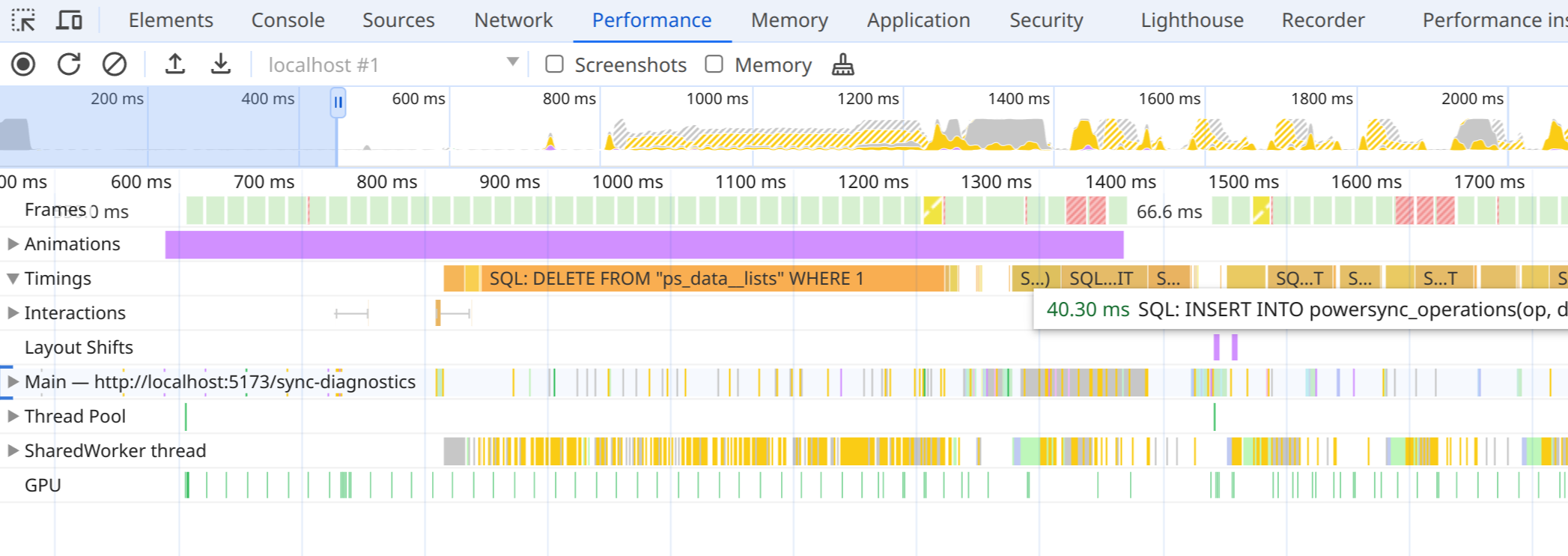
- PowerSync queries from client code.
- Internal statements from PowerSync, including queries saving sync data, and begin/commit statements.
- The time waiting for the global transaction lock, but includes all overhead in worker communication. This means you won’t see concurrent queries in most cases.
- Internal statements from
powersync-sqlite-core.
PowerSyncDatabse: