


Build a Responsive Website
A course on how to build a website from a design with HTML, CSS, and JS.
 Created by Coder Coder
You’ve learned the basics of HTML and CSS… now what?
Sure, you can follow a tutorial and have gotten pretty at Googling to find answers, but the thought of starting a completely new website project terrifies you.
You’re doing the best you can learning bits at a time. But you feel like you’re stuck trying to fix weird CSS issues more often than you’re successfully writing code.
Where do you even begin?

Imagine…
- Not being stuck staring at your blank VS Code editor, but knowing how to jump in and start creating your website files.
- Being able to translate Figma design files into a front-end website that looks good on all devices.
- Feeling comfortable using both flexbox and grid, and knowing when to use each.
- Not writing spaghetti code, but organizing your CSS styles with CSS layers and custom properties in a way that makes sense, even weeks or months later.
- Understanding how CSS works, even some of the quirkier (ahem, more frustrating) parts.
Sounds great, but how do you get there?
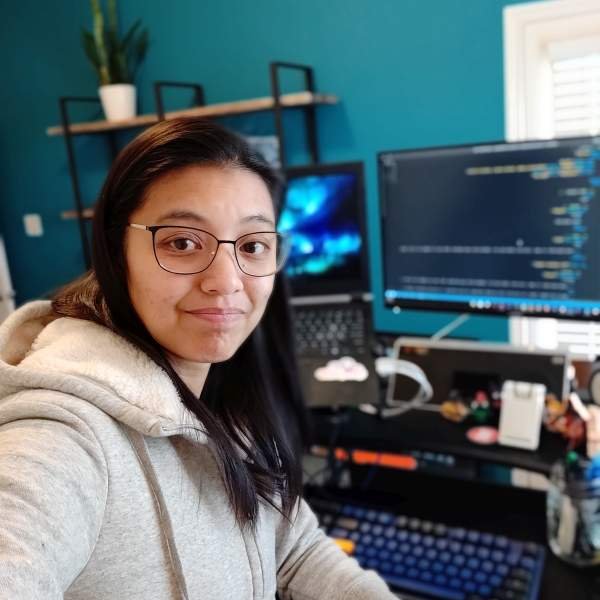
Hi there! 👋🏼 I’m Jess Chan.
I create tutorials for beginner web developers on YouTube. But in my previous life, I worked for 8 years as a web developer for advertising and marketing companies.
Also, you might not know that I’m also a self-taught developer. I didn’t get a computer science degree or even go to a coding bootcamp.
It was incredibly tough starting out. I often felt extremely lost and confused, spending literal hours Googling and desperately trying different solutions to fix bugs.
Over the years, I learned more about how CSS worked, and why it would behave in very weird ways sometimes. And I became something of a specialist in taking a design file and turning it into a custom, responsive website.

I’ll show you how to think like a professional web developer.
Going through tutorials is great, but it’s not the same as seeing how a professional would build a website from a design, from the ground up.
In this course, I’ll take you step-by-step through the process of building a website from scratch with HTML, CSS, and JavaScript.
I’ll also explain my reasoning and decision-making the whole way– something that is missing from most web dev tutorials. Think about it like having a senior developer talking you through an entire website build– and getting to ask them questions the whole way!
You can do the same thing on your own, of course, but I can save you a lot of time by teaching you an efficient approach to building websites.
My ultimate goal is for you to hit a point where you feel confident in your CSS skills, and comfortable in your ability to research and problem solve— even for things you don’t know off the top of your head.

Quincy Larson Teacher, freeCodeCampJessica can distill even the most complicated coding concepts down into easy-to-understand lessons. She makes it look effortless. As a teacher myself, I respect how adeptly Jessica is able to equip beginner web developers with coding skills.

What’s in this course?
This course is formatted a bit differently from other courses you may have seen.
Instead of focusing each lesson on different CSS properties or topics, the entire course follows building a website from a Figma design, and how to handle common problems that you’ll encounter along the way.
Responsive Design for Beginners is actually made up of 2 courses: BASIC and ULTIMATE.
The BASIC Course is 8 hours long and in it, we’ll set up VS Code, our GitHub repository, and navigate the Figma design, before building a basic website that’s great for beginners.
The ULTIMATE Course is 7 hours long and in it, we’ll build additional sections that require more difficult CSS skills, as well as an animated hamburger menu with JavaScript.
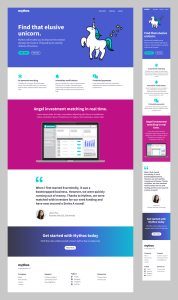
Check out the Figma designs that we’ll be using for each of the courses:

Why did I format the course this way?
Over the years working in marketing and advertising, I realized that a huge part of being a web developer is being able to solve problems and how to build X, Y, and Z.
No client is going to quiz you on all the possible values of the CSS position property. They don’t care about that.
What they do care about is if you can make those cards 3-columns across on desktop and stack to 1 column on mobile. Or making sure the image of their product doesn’t look pixelated and weird on Retina screens.
Going through this course will try to emulate what working as a web developer is like in real life:
- Setting up your workflow in VS Code
- Organizing your project files
- Creating a GitHub repository to track changes
- Navigating a Figma design and interpreting it into CSS styles
- Using Google Fonts to load custom fonts
- Building an accessible, responsive website with HTML, CSS and JavaScript
- Troubleshooting your styles with Firefox Developer Tools
- Deploying your website to Netlify
Okay, but what will I actually be learning?
I purposefully designed the website and the curriculum to to hit the most common design patterns and CSS problems that you will encounter.
Some of the topics we’ll be covering in each course…
Basic Course (8 hours)
- Using proper semantic HTML tags
- Writing efficient styles with: organized class names, CSS custom properties, and helper/utility classes
- The CSS cascade
- Normal flow with inline, inline-block, and block elements and weird quirks with them
- Layout with flexbox and grid
- When to use CSS units like px, em, rem, ch, %, and more
- CSS custom properties for colors and fonts
- Responsive images with srcset and DPR (Device Pixel Ratio)
- SVG and inline SVG images
- Animated hover effects with CSS transitions
- Linear-gradient() backgrounds
- Doing math in CSS with the calc() function
Ultimate Course (7 hours)
- Animated underlines and backgrounds for hover states
- CSS grid template areas and named grid lines
- SVG shapes
- Using the ::before and ::after pseudo-elements
- Styling form elements
- Building an animated, accessible hamburger menu with JS
- Stacking contexts and z-index
- Mapping out color themes with CSS custom properties
- Building a block grid with CSS grid, auto-fit, and minmax()
- Overlapping content with CSS grid
- Absolute positioning elements
- Sizing images with object-fit and object-position
- Adding filters to images with mix-blend-mode

Matt Studdert Founder, Frontend MentorJessica is a brilliant instructor who takes so much care to make sure her students learn as much as possible. The way she breaks down concepts and explains details leads to a lot of lightbulb moments!
Curious to see what the course is actually like?

I’ve put the first 3 hours of the course up on YouTube for free!
Testimonials
Here’s what some people have said about the course:

Tom K. Junior Front-end developer, Austria
This course is simply unbelievably good. I have used the last couple months intensively to work my way into web development on my own and was able to land a job in the end. And this course played a big part.
In combination with Jess’ unique buddy-like teaching style and the snack-able chapters, it was very engaging and also a lot of fun to learn all about responsive design with CSS.
With all the acquired knowledge, I’ve built my fluid responsive portfolio … and that definitely made an impression on my bosses. :) Thank you, Jess!

Julia Dearden Web Engineer from the US
Responsive Design for Beginners is an immersive course that is an incredible resource to utilize for learning anything and all web-dev! Even as an existing developer, I found myself learning brand new concepts and staying engaged.
The course shows different ways to approach the same solution, with clear pros and cons for each method, and makes the content easy to transfer into your own development projects/work. I will definitely be re-watching videos.

Brett Egbert (crossinguard) Educator and aspiring front-end developer from the USA
Responsive Design for Beginners hit the right skills at an appropriate level. What sets it apart is the emphasis on realistic workflows, troubleshooting, and verification of expected output.
I have completed several beginner HTML + CSS courses and this is the first course that places such a strong emphasis on the “why”, not just the “how”. This approach makes the course relevant to all future projects, not just creating a static site from a design file. Also, the video graphics are dope.

Jesse Hall (codeSTACKr) Senior Developer Advocate and YouTuber
Jess’ teaching style is incredibly effective, breaking down complex CSS and HTML concepts into digestible lessons. The course not only teaches you how to write clean, responsive styles but also guides you through the entire development workflow, from setting up your environment to deploying your site.
And the production quality of this course is unparalleled. If you want to elevate your front-end skills and build websites that look good on all devices, this course is your blueprint.

Vince Mendella Front-end developer / UX/UI Designer
This is a wonderful and very informative course to start your web development journey. I am a working Front-end Developer and found this course helpful.
Jess’s teaching style promotes self-learning and helps the students develop critical thinking skills and retain knowledge. I very much recommend this course.
Frequently Asked Questions
Who is this course for?
I created this course for beginner web developers. However, you should know at least the basics of HTML and CSS before starting. It’s okay if you don’t know JavaScript, though!
I think this course would be a good fit for you if:
- You’ve been going the self-taught route, but don’t feel super confident in your CSS skills.
- You know CSS, but struggle to put it into practice to build real-world projects.
- You’ve built websites using Tailwind or Bootstrap, but want to get better at CSS fundamentals.
- You’re a back-end developer who wants to get better at the front-end.
Who is this course NOT for?
If you’re a complete beginner to HTML and CSS, this course may go a little over your head.
Also, if you’re looking for a JavaScript-heavy course, you will be disappointed. We’ll be using JavaScript to build sections like the hamburger menu, but this course is more focused on writing responsive styles.
Will you support PPP (Purchasing Power Parity)?
Yep! When the course opens, if you’re loading the website from a country with a significantly lower purchasing power, you will see a banner up at the top with a custom coupon code you can use at checkout. Note: the banner won’t work with a VPN, so if it’s not loading, make sure you are not using a VPN.
Are there subtitles / captions?
Yes, I’m using auto-generated subtitles for all the videos.
What will the course give me that your YouTube videos don’t?
Honestly, a lot. I do make very in-depth coding tutorials on YouTube, but they’re more of a “live coding” style where I’ll explain things as they come up.
Making this course has involved a lot of planning beforehand. I designed the custom Figma design carefully in order to cover the topics in CSS that I think are important to learn. And for all the videos, I wrote out all the scripts word by word, and in many cases did hours of research and testing in order to make sure I’m teaching things correctly.
If I don’t like the course, can I get a refund?
Yes! If you don’t like the course, you can get a refund within 30 days of purchase, no questions asked. Just send me an email at [email protected] and I’ll issue you a full refund.
Gain the skills you need to build real-world responsive websites.
Basic Course only
Includes:
- Basic Course
- Ultimate Course
- Basic CSS skills
- Lifetime access & updates
- 30-day money-back guarantee
Ultimate Bundle
Also available: 10-month payment plan
($40/mth)
Includes:
- Basic Course
- Ultimate Course
- Advanced CSS skills + JS
- Lifetime access & updates
- 30-day money-back guarantee
Not ready to buy?
Sign up to get emails the next time the course goes on sale (usually twice a year):
You can unsubscribe easily any time. See our privacy policy for more information.