The Applitools Intelligent Testing Platform
Build and optimize end-to-end tests easily—with or without code. The Applitools Intelligent Testing Platform is an all-in-one solution to validate visual, functional, and API tests with advanced Visual AI to accelerate every release cycle.
How it works
Industry-leading AI supports
every stage of the testing lifecycle
Test Creation
Create end-to-end tests with or without code
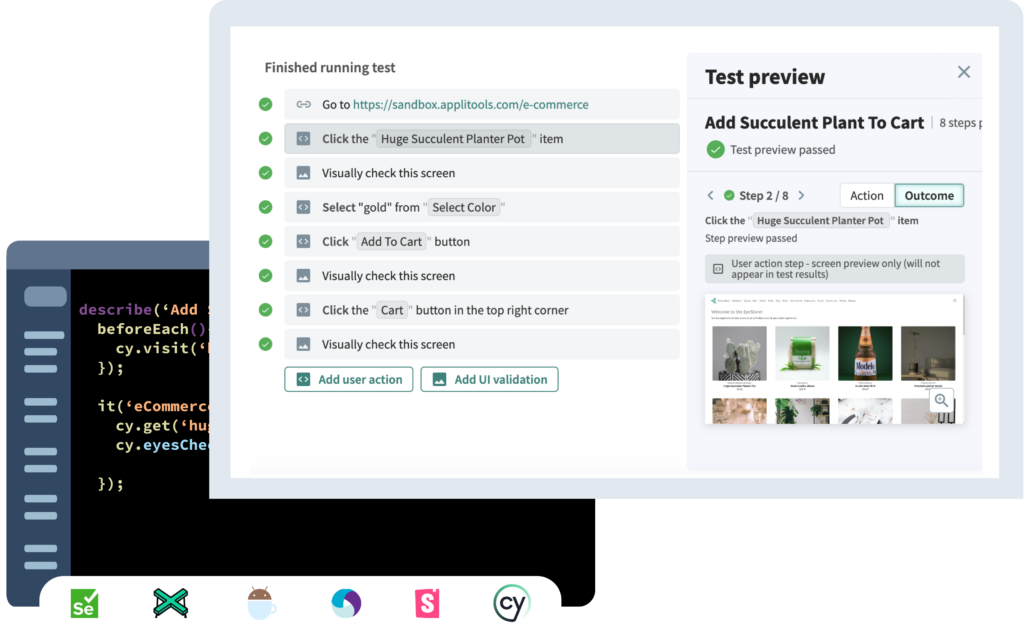
Build end-to-end tests covering visual, functional, and API validation, all within a single test—whether you’re a coding expert or prefer no code solutions. Let every team member, regardless of skill level, easily craft tests.
Connect Applitools to any test framework or programming language with extensive SDKs to enable developers to use their current skills and workflows.
Applitools has an easy to use recorder that enables anyone on the team to create complex, end-to-end tests without writing code. Even create synthetic data to be used to expand coverage.
Natural Language Processing makes it possible to create end-to-end tests using plain English language and syntax, making the learning curve for testing significantly reduced.
Enter your website or application domain into the site crawler or upload a list of URLs and Applitools will automatically add Visual AI checkpoints to each, reducing weeks’ worth of testing to just minutes.
Test EXECUTION
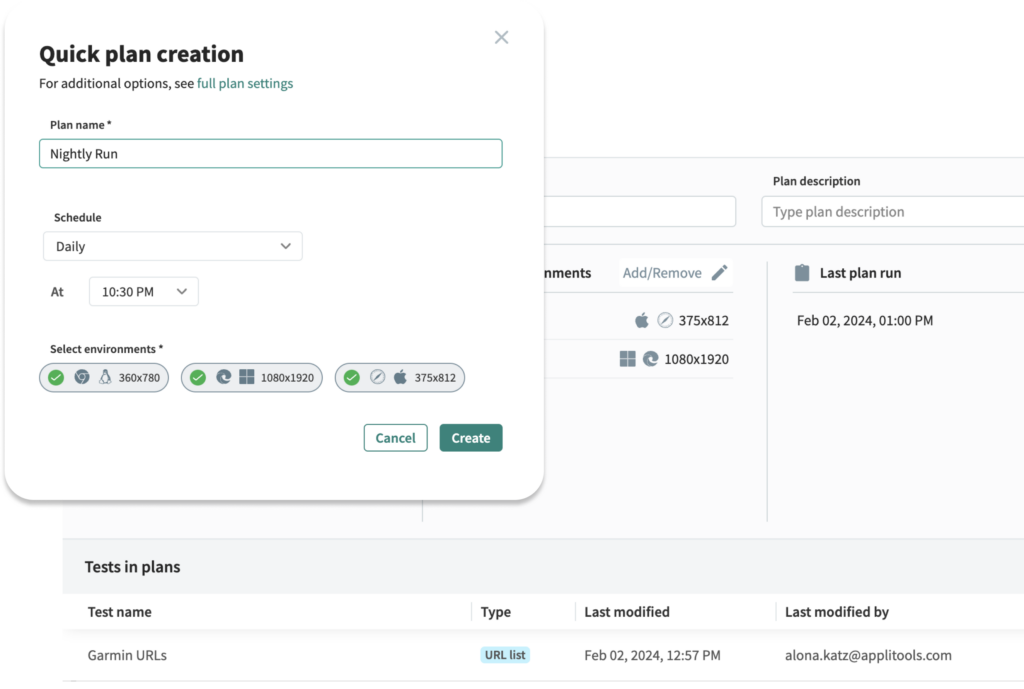
Proactively monitor apps by integrating with your CI/CD or scheduling test runs
Applitools fits right into your development workflow to help ensure your CI/CD jobs are finishing fast and applications are tested in a continuous manner.
For fast-moving interfaces or compiled frameworks, self-healing locators greatly reduce test maintenance and keep your test pipelines clean and flowing!
Run entire test suites or individual tests with just the click of button from the Autonomous platform.
Integrate Autonomous with your CI/CD tools and workflows like GitHub Actions, CircleCI, and more to continuously kick off tests during each pull request and merge.
Create test plans that monitor your websites and applications at set intervals, proactively catching regressions that may be introduced from user generated content or third-party APIs.
Test VALIDATION
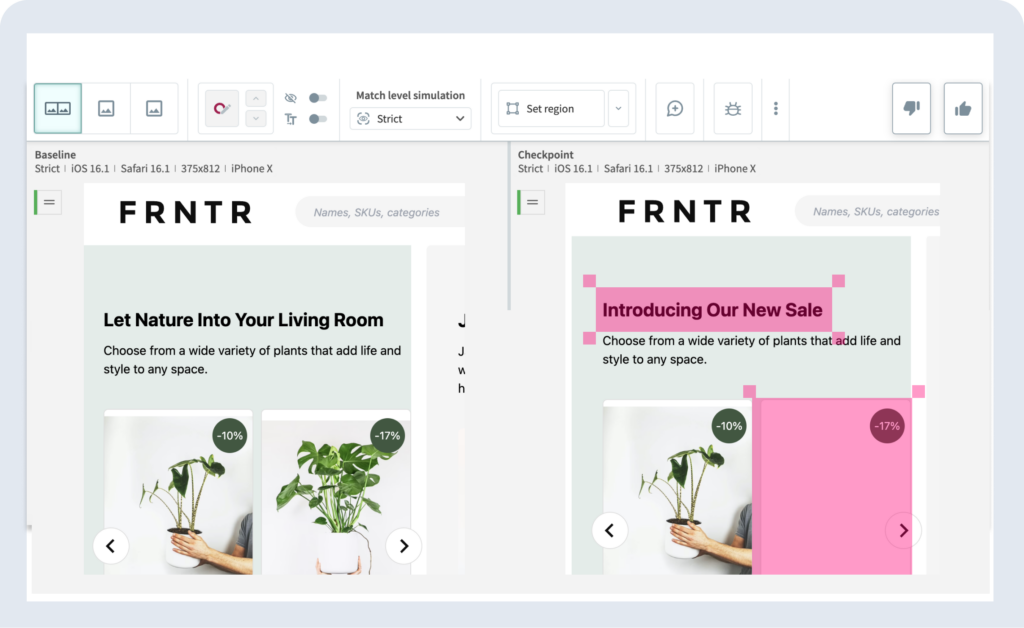
Review any changes identified by Visual AI
Applitools enables developers, testers, product owners, and others to build powerful tests with the tools they love most.
Applitools intelligently understands which errors are critical and which are acceptable with advanced match levels. Even fine tune the targeting of Visual AI further by choosing to highlight or ignore certain regions of the UI.
With the click of a button, build tests that are able to match multiple baselines – perfect for A/B experiments and localized languages.
Collaborate with others across the SDLC by commenting directly on UIs and filing bugs with integrations for your favorite bug tracking tools.
Applitools automates the grouping of similar errors across different apps and environments for easier, quicker maintenance at scale, and highlights exactly what went wrong using root cause analysis.
TEST ANALYSIS
Release changes quickly, with extreme confidence
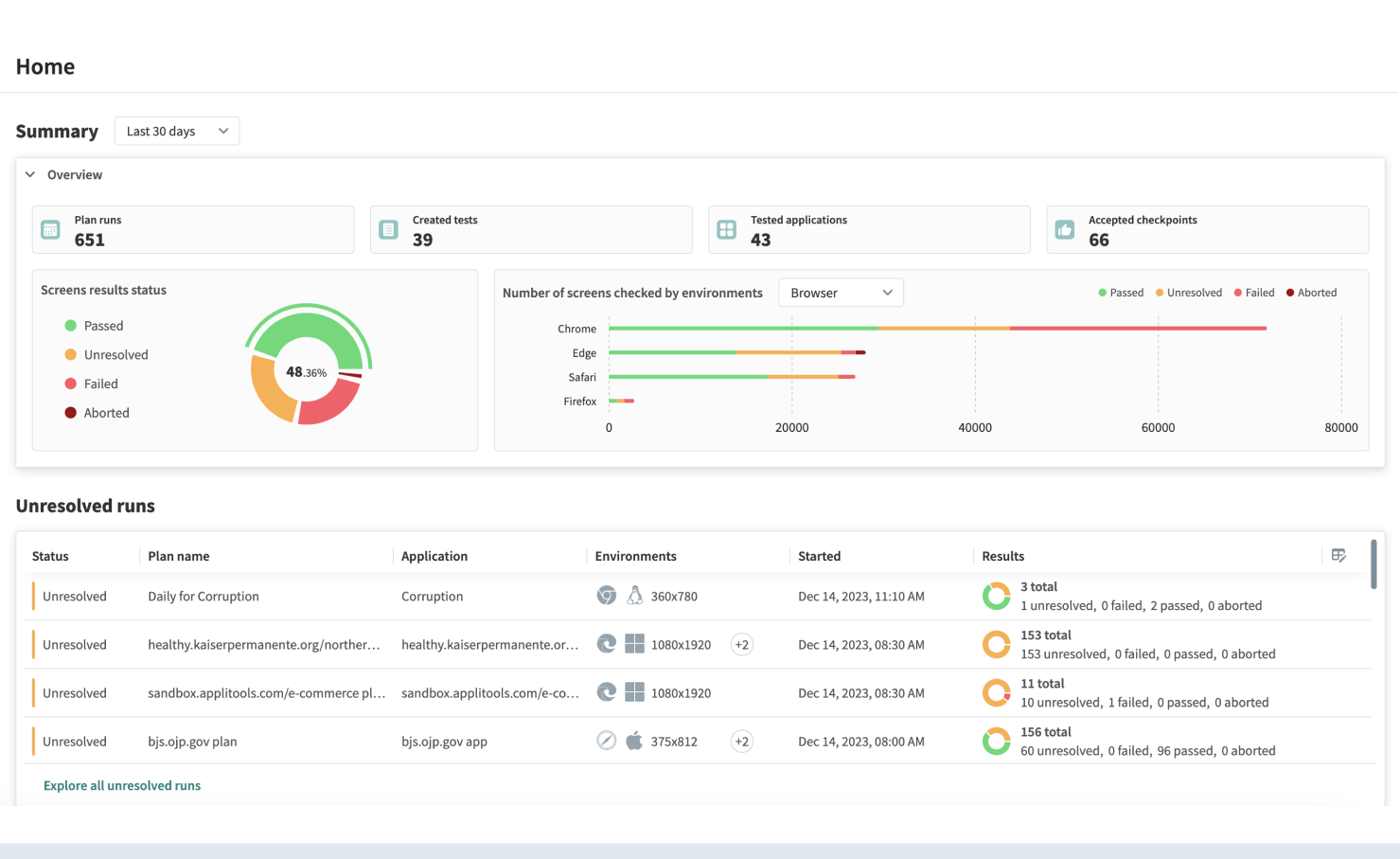
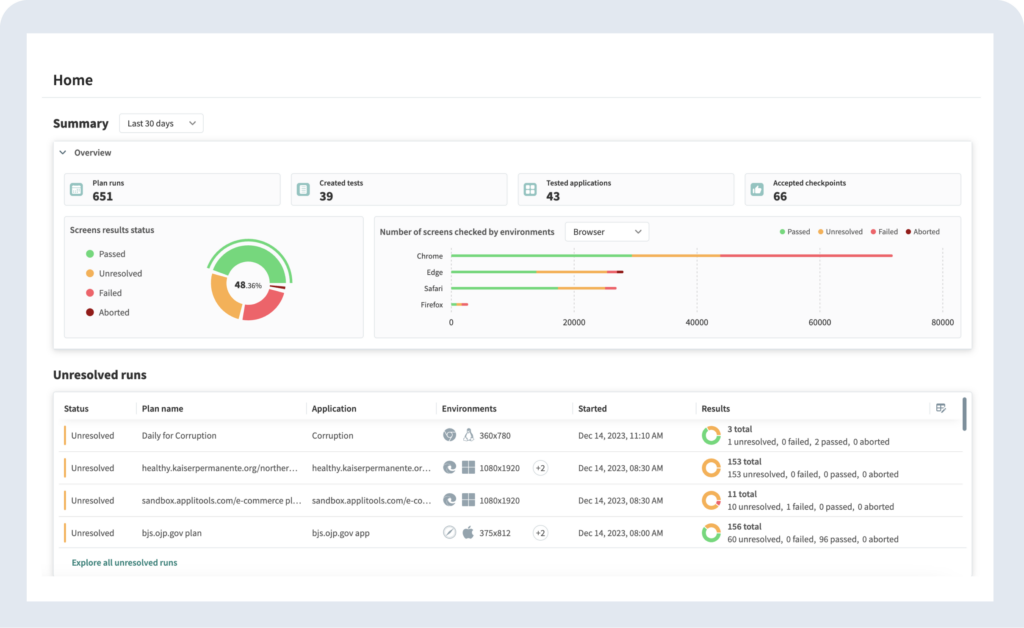
Applitools reporting and analysis solutions make it simple to glean real insights from test suites.
Applitools intelligently understands which errors are critical and which are acceptable with advanced match levels. Even fine tune the targeting of Visual AI further by choosing to highlight or ignore certain regions of the UI.
Applitools quickly reproduces your entire UI across hundreds of modern browsers in seconds, compare it to your baseline using advanced algorithms, and determine whether there are visual defects that matter to the end user.
Applitools enables accessibility validation, focusing on the standards that define minimum contrast ratios for text and graphics. This makes it easy to test your interfaces for accessibility defects like WCAG 2.0 and 2.1.
The Applitools Intelligent Testing Platform
The only platform with AI powering every step of the testing lifecycle, delivering superior testing for your company no matter where you are on your testing journey.
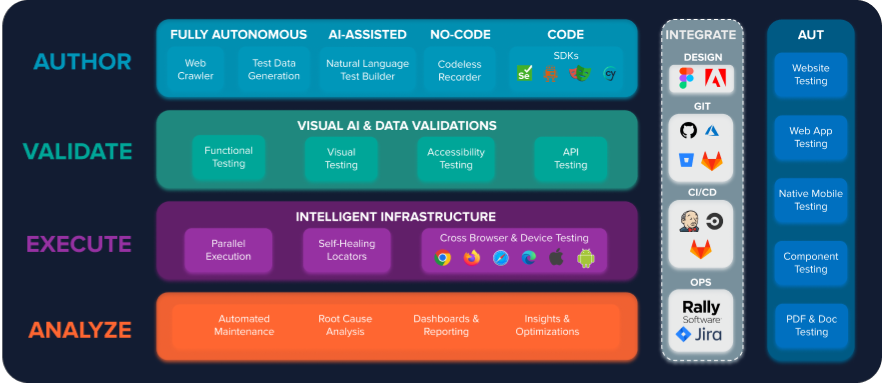
Code and No-Code Test Authoring
Build powerful end-to-end tests any way you choose: with a recorder, Generative AI, or just by integrating into your current framework.
No-Code Browser Recording
Speed up authoring by recording steps in English, and easily refine manually if needed.
Functional data-driven testing
Easily perform data-driven and dynamic data testing with variables, parameters, and textual assertions.
SDKs for Testing Frameworks
Embed powerful visual validation directly into test scripts with SDKs supporting multiple languages and frameworks.
Plain English Test Authoring
Build custom end-to-end tests using nothing more than plain English—no coding or locators skills required.
Accurate UI Validation
Increase test coverage with AI assertions using a single command to ensure functional, visual, API, and accessibility correctness.
AI-Powered Visual Testing
Visual assertions you can trust that scale with you. Avoid repetitive maintenance activities.
Dynamic Assertions
Use Visual AI to easily test dynamic, content-heavy websites without having to rewrite and maintain tests.
Accessibility Testing
Validate features like text-to-background contrast and focus indicators, ensuring compliance.
Any UI Technology
Validate web, mobile, or desktop apps, PDF documents, design images, UI components, and more.
Faster Test Execution
Ship faster by speeding up test runs, reducing flaky results, and replicating browsers at scale.
Visual AI Engine
Use Visual AI to validate hundreds of elements across different browsers instantly with a single line of code.
Parallel Execution
Test your public and internal apps on any device, browser, operating system, and screen size—in parallel.
Self-Healing Tests
Tests are based on visual elements rather than locators, making them robust to any technology changes.
Flexible Orchestration
Run tests on demand, from your CI/CD, a webhook, or use our built-in test scheduler.
Analyze Tests for Actionable Insights
Get deep insights into every test run and aggregate data from all of your tests into a single dashboard.
Intuitive Dashboards
Intuitive interfaces for tracking test results, making it easier for all team members to contribute.
Root Cause Analysis
Quickly surface exactly what code changes occurred to cause each UI change.
Scalable Maintenance
Automatically group together similar changes and accept or reject differences once across all pages, devices, and browsers.
Test Analysis
Provides detailed dashboards and actionable insights to track results and optimize testing processes.






Start Your Free 14-Day Trial
Whether you’re looking for advanced end-to-end automation to handle complex,
multi-step workflows or need a powerful visual validation tool to refine your UI and UX, the Applitools Intelligent Testing Platform has a tool for you.
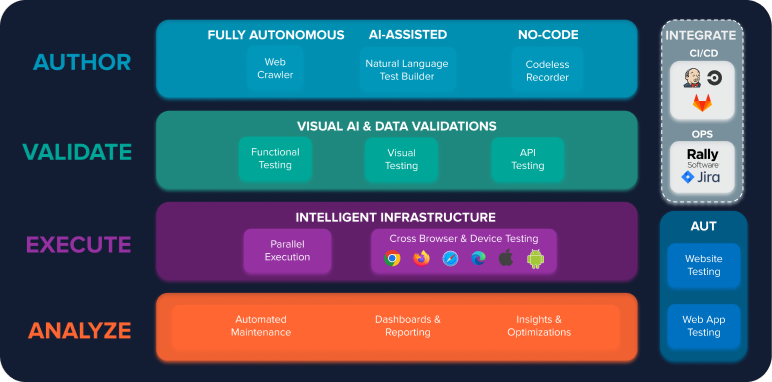
APPLITOOLS AUTONOMOUS
For teams that want a fully automated, no-code testing solution that integrates functional, visual, and API testing to streamline critical test flows.
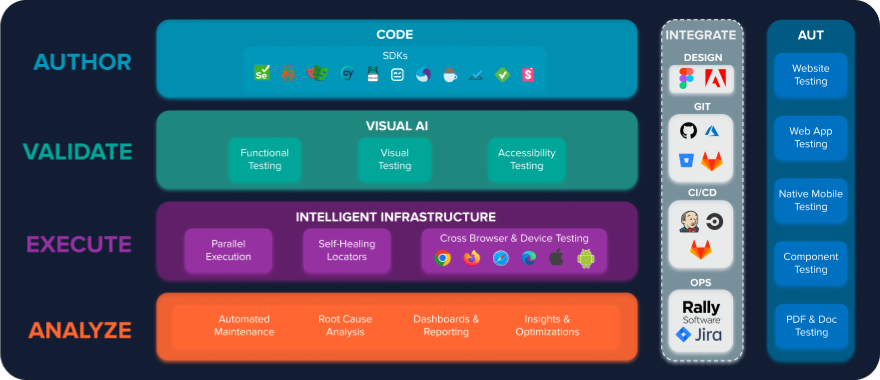
APPLITOOLS EYES
For teams already using a testing framework or that want to integrate visual testing into their existing coded test suites like Cypress or Playwright.
Frequently Asked Questions
The Applitools testing platform leverages proprietary Visual AI through Applitools Eyes and Applitools Autonomous to deliver faster, smarter test automation. This technology validates the actual user experience, going beyond code-level checks to catch issues that traditional tools miss.
Applitools applies a blend of Visual AI and deterministic language models to make test creation and validation both accurate and explainable. Unlike generative AI and other LLMs, our approach ensures consistent results and avoids the randomness that can create flakiness in test automation.
Applitools works alongside the tools you already use. Eyes integrates with popular test frameworks like Selenium, Cypress, and Playwright, while Autonomous plugs into CI/CD pipelines to automatically generate and run tests. Together they strengthen your release process without replacing existing investments.
By combining functional, visual, and autonomous testing, Applitools goes beyond code coverage to validate the actual user journey. This ensures applications not only pass tests but look and behave correctly across browsers and devices.
Teams across industries—from financial services to retail to technology—rely on Applitools to improve quality at scale. Customers range from startups to global enterprises, with use cases spanning web, mobile, and desktop apps.
The platform is continuously evolving with new features, integrations, and AI enhancements. Visit our What’s New page for the latest updates.